flowchart TD
  Q((Where is<br>data stored?))
  A1[[Database]]
  A2[[Data Warehouse]]
  A3[[Data Lake]]

  P1((for OLTP))
  P2((for OLAP))
  P3((for storing raw data))

  E1[Amazon RDS<br>for an e-commerce<br>application]
  E2[Amazon Redshift<br>to query and analyze <br>vast amounts of <br>structured data<br>quickly and efficiently.]
  E3[Amazon S3<br>for storing vast amounts of<br>unstructured raw data]

  Q --> A1
  Q --> A2
  Q --> A3

  A1 --> P1 --> E1
  A2 --> P2 --> E2
  A3 --> P3 --> E3
06. Databases
👈 Back to: 📝 Blog | 💼 LinkedIn | ✍️ Medium
Databases in AWS
- ❓ When do you pick RDS vs DynamoDB—and why does it matter?
- Hint: Think in terms of data model, access patterns, and scale requirements—not just “SQL vs NoSQL”.
6.1 Database vs Data Warehouse vs Data Lake
A quick way to choose the right “data home” in AWS:
- A database is optimized for application transactions and frequent reads/writes (OLTP). Common AWS picks are Amazon RDS (relational) and Amazon DynamoDB (NoSQL).
- A data warehouse is optimized for analytics across large, structured datasets (OLAP). In AWS, this is commonly Amazon Redshift.
- A data lake is a flexible storage layer for raw structured, semi-structured, and unstructured data. In AWS, this is typically Amazon S3, queried/processed later with services like Athena/Glue/EMR.
| Feature | Database (RDS/DynamoDB) | Data Warehouse (Redshift) | Data Lake (S3) |
|---|---|---|---|
| Primary Use | Transactional (OLTP) | Analytical (OLAP) | Store raw data, Big Data |
| Data Type | Structured | Structured, Semi-structured | Structured, Semi-structured, Unstructured |
| Processing | Real-time transactions | Aggregated, Complex queries | Data exploration, batch processing |
| AWS Service | Amazon RDS, DynamoDB | Amazon Redshift | Amazon S3 |
| Example | E-commerce apps, customer orders | Business analytics, dashboards | Raw data for analytics, ML |
6.2 Are AWS databases always on EC2? What’s with db.xxx?
- Many AWS databases are managed services, where you don’t manage servers directly.
- Some managed services still use underlying compute, but you interact through the service layer, not the EC2 instances.
- The
db.prefix commonly shows up as an RDS/Aurora instance class naming convention (example style:db.t3.medium), not as a universal AWS database naming rule.
6.3 PostgreSQL on AWS: self-managed vs managed
- Self-managed on EC2 gives full control (install/patch/backup/tune yourself), useful for highly custom setups.
- Managed PostgreSQL (Amazon RDS for PostgreSQL or Aurora PostgreSQL-compatible) reduces operational overhead with built-in management features, at the cost of some constraints on customization.
6.4 Managed databases in AWS
flowchart TD
  DB((Databases))
  ADB[Databases in AWS]
  M[AWS Managed Databases]
  UM[Self Managed Databases]
  OP[On-Prem Database]
  SM[Self-managed Database on Amazon EC2]

  M1[Amazon RDS]
  M2[Amazon Aurora]
  M3[Amazon DynamoDB]
  M4[Amazon Redshift]

  REL((Releational DB))
  MEX1[MySQL]
  MEX2[PostgreSQL]
  MEX3[MariaDB]
  MEX4[SQLServer]
  MEX5[Oracle]

  MAA1[Aurora MySQL]
  MAA2[Aurora PostgreSQL]

  MAAP1((5x faster than RDS))
  MAAP2[Aurora Serverless]

  NOREL((NoSQL DB))

  DDB1((Serverless))
  BOTH1((Charges based on usage and storage))
  BOTH2((High Availability))
  BOTH3((High Durable))
  BOTH4((Because: SSD-backed Instances))

  DB --> ADB
  DB --> OP

  ADB --> M
  ADB --> UM
  ADB --> SM
  M --> M1
  M --> M2
  M --> M3
  M --> M4

  M1 --> REL --> MEX1
  REL --> MEX2
  REL --> MEX3
  REL --> MEX4
  REL --> MEX5

  M2 --> MAA1 --> MAAP1
  M2 --> MAA2 --> MAAP1
  M2 --> MAA1 --> MAAP2
  M2 --> MAA2 --> MAAP2
  MAAP2 --> BOTH1
  BOTH2 --> BOTH4
  BOTH3 --> BOTH4

  M3 --> NOREL --> DDB1 --> BOTH1
  DDB1 --> BOTH2
  DDB1 --> BOTH3
  MAAP2 --> BOTH2
  MAAP2 --> BOTH3
- In AWS one would generally choose AWS managed options like RDS/Aurora/DynamoDB/Redshift than installing and operating databases yourself on EC2.
6.5 Decisions to make when choosing a DB
flowchart TB
  DB[Choices<br>in Selecing a DB<br>in AWS]
  ENG[Engine]
  STORAGE[Storage]
  COMPUTE[Compute]

  ENG1((Commercial))
  ENG2((Open Source))
  ENG3((AWS Native))

  ENG1A[[Oracle<br>SQLServer]]
  ENG2A[[MySQL<br>PostgreSQL]]
  ENG3A[[Amazon Aurora]]


  STORAGE1[[EBS Volumes for RDS]]
  COMPUTE1[[Compute Instance <br>Size and Family <br><br>db.xx?]]

  TYPE1[Standard<br> <code>m</code> classes?]
  TYPE2[Memory<br>Optimized<br><code>r</code> and <code>x` classes?]
  TYPE3[Burstable<br><code>t</code> classes?]

  S1[SSD?]
  S2[HDD?]
  S3[Magnetic Storage?]

  DB --> ENG --> ENG1
  ENG --> ENG2
  ENG --> ENG3

  ENG1 --> ENG1A
  ENG2 --> ENG2A
  ENG3 --> ENG3A

  DB --> STORAGE --> STORAGE1
  DB --> COMPUTE --> COMPUTE1

  STORAGE1 --> S1
  STORAGE1 --> S2
  STORAGE1 --> S3

  COMPUTE1 --> TYPE1
  COMPUTE1 --> TYPE2
  COMPUTE1 --> TYPE3
Practical selection checklist:
- Pick the engine based on compatibility, licensing, and operational preference (commercial vs open-source vs AWS-native).
- Pick the storage and compute class based on workload shape:
- “Standard” for balanced workloads
- “Memory optimized” for heavy caching/large working sets
- “Burstable” for spiky, low-to-moderate average usage
- Align storage media (SSD/HDD) with latency and throughput needs.
6.6 Where database instances sit in AWS networking
6.6.1 RDS lies inside VPC Private Subnet
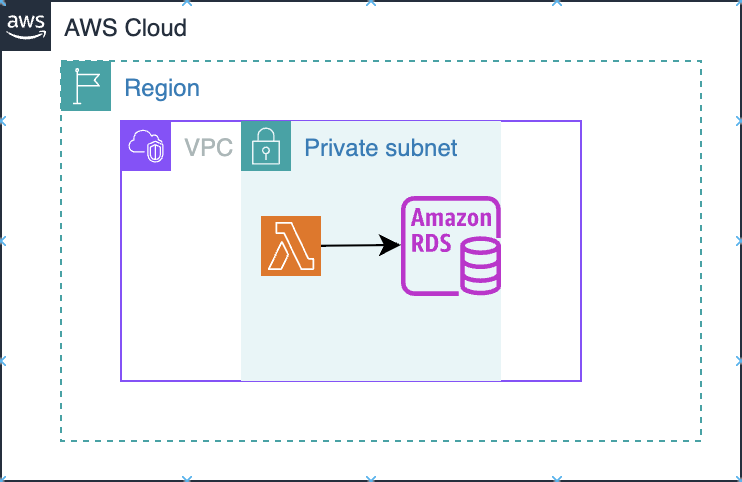
Amazon RDS is deployed into your VPC (into subnets you choose via a DB subnet group), so it behaves like a VPC resource: it gets private IPs and is governed by VPC routing + security groups.
- The primary control plane for “who can connect” is the VPC security group attached to the DB instance. You typically allow inbound DB ports only from your app tier’s security group (or a tight CIDR), not from the open internet.
- If the DB is not publicly accessible, clients from outside the VPC need a private connectivity path (VPN/Direct Connect/Client VPN, or other private network patterns).
6.6.2 DynamoDB lies outside VPC
DynamoDB is a regional AWS service, not placed “inside” your VPC like RDS. Your app talks to DynamoDB’s regional endpoint over HTTPS.
A VPC endpoint is not required if your compute already has a path to reach AWS public service endpoints (for example: Lambda not in a VPC, or instances in a public subnet, or private subnets with NAT/egress). In those cases, calls to DynamoDB work without you creating an endpoint.
A VPC endpoint becomes important when your compute runs inside a VPC private subnet and you want private connectivity without NAT/Internet egress. AWS explicitly documents that a gateway VPC endpoint lets you access DynamoDB from your VPC “without requiring an internet gateway or NAT device” and that you add it as a route-table target.
AWS guidance for Lambda-in-VPC patterns similarly calls out creating a gateway endpoint for DynamoDB and updating the private subnet route table to use it.
From a security best-practice angle, your internal security notes also recommend using VPC endpoints to access DynamoDB.
DynamoDB doesn’t live in your VPC.
If you need private subnet → DynamoDB access without NAT/internet egress (and often to reduce NAT cost / keep traffic on AWS network), use a DynamoDB VPC endpoint (gateway endpoint is the common choice for in-VPC access).
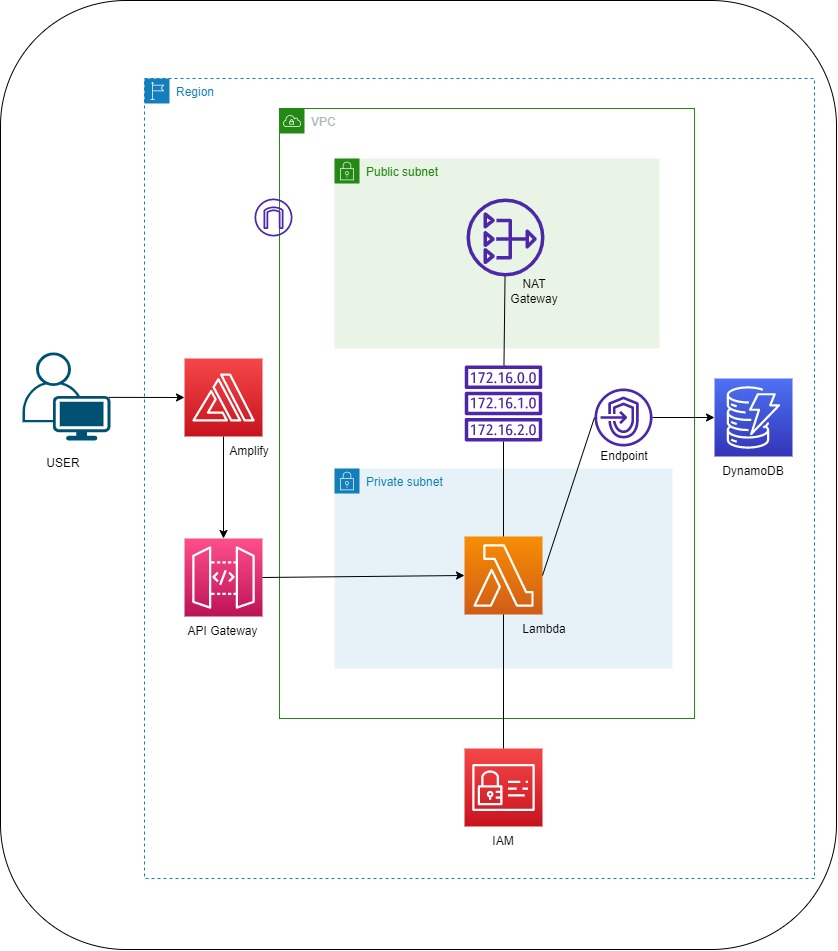
- Use no endpoint when your runtime already has outbound access to AWS public endpoints.
- Use a gateway VPC endpoint when your runtime is in private subnets and you want no NAT/IGW dependency for DynamoDB traffic.
High-level intuition:
- RDS is deployed into your VPC (commonly private subnets).
- DynamoDB is a regional managed service that’s not “inside” your VPC like an EC2 instance; private access patterns typically rely on networking constructs
6.7 Backups in RDS
flowchart TD
  B((Backups))
  A((Automated Backups))
  M((Manual Snapshots))

  K((Keep backups<br>for 0 to 35 days))
  ZERO((0 days means<br>no backup))
  E((Enables in<br>point-in-time<br>recovery))

  P((For storage<br>longer than 35 days))

  Q((Which backup<br>to use))
  ANS((Both Automated &<br>Manual combo))

  B --> A
  B --> M

  A --> K --> ZERO --> E

  M --> P

  B --> Q --> ANS
Essentials:
- Automated backups support point-in-time recovery within the configured retention window.
- Manual snapshots are useful for keeping backups longer than the automated retention period.
- A practical approach is using both: automated backups for operational recovery, snapshots for long-term retention or milestones.
6.8 Redundancy in RDS via Multiple Availability Zones
flowchart TD
  RDS[[Amazon RDS]]
  subgraph AZ1
     subgraph subnetA
       C1[[Copy 1 of RDS]]
     end
  end

  subgraph AZ2
    subgraph subnetB
      C2[[Copy 2 of RDS]]
    end
  end
  RDS --> C1
  RDS --> C2
  %% Apply bright yellow background to subgraphs
  style AZ1 fill:#FFFF00,stroke:#333,stroke-width:2px
  style AZ2 fill:#FFFF00,stroke:#333,stroke-width:2px
  style subnetA fill:#FFFF00,stroke:#333,stroke-width:2px
  style subnetB fill:#FFFF00,stroke:#333,stroke-width:2px
- Multi-AZ deployments aim at improved resilience through cross-AZ redundancy.
- Multi AZ deployment ensure
High AvailabilityandHigh Durability
6.9 Encrypting EBS volumes used by EC2 workloads
Consider this scenario: You are a cloud engineer who works at a company that uses Amazon Elastic Compute Cloud (Amazon EC2) instances and Amazon Elastic Block Store (Amazon EBS) volumes. The company is currently using unencrypted EBS volumes. You are tasked with migrating the data on these unencrypted EBS volumes to encrypted EBS volumes. What steps can you take to migrate the data to encrypted EBS volumes?
To migrate data from unencrypted to encrypted Amazon EBS volumes, follow these steps:

1. Create a snapshot of the unencrypted EBS volume.
2. Copy the snapshot, and during the copy process, select the option to encrypt the snapshot.
3. Once the encrypted snapshot is created, create a new EBS volume from the encrypted snapshot.
4. Detach the unencrypted volume from the EC2 instance.
5. Attach the new encrypted volume to the EC2 instance in place of the original.

This ensures seamless migration of data from unencrypted to encrypted EBS volumes without downtime.
Source: One of the answers from a Cousera Forum
6.10 DynamoDB essentials
- Amazon DynamoDB is a fully managed NoSQL database service.
- It scales to handle large request volumes and large datasets.
- Data is stored as key-value style items with flexible attributes.
| RDS | NoSQL DB |
|---|---|
| Table | Table |
| Row/Record | Item |
| Column | Attribute |
Like a primary column in RDS, a primary attribute is needed in Dynamo DB. An item could have any number of attributes
6.11 Final Recap - RDS vs DynamoDB — How to Choose
| Decision Factor | Amazon RDS (Relational) | Amazon DynamoDB (NoSQL) |
|---|---|---|
| Data model | Structured (tables, schema) | Flexible (key-value, attributes) |
| Query patterns | Complex joins, transactions | Simple, predictable access patterns |
| Scaling | Vertical + read replicas | Automatic horizontal scaling |
| Performance | Good, but depends on tuning | Single-digit ms at massive scale |
| Transactions | Strong ACID support | Limited (but supports transactions) |
| Use cases | Banking, ERP, transactional systems | High-scale apps, gaming, IoT, APIs |
| Ops overhead | Moderate (patching, tuning) | Minimal (fully managed/serverless) |
| Networking | Inside VPC (private subnets) | Outside VPC (via endpoints) |
Rule of thumb:
- Use RDS when:
- You need relationships, joins, strict schema
- Example: orders, payments, financial systems
- Use DynamoDB when:
- You need massive scale + predictable access patterns
- Example: user sessions, leaderboards, event data