04. Networking
👈 Back to: 📝 Blog | 💼 LinkedIn | ✍️ Medium
4 Networking on AWS
❓ What actually happens inside a VPC when your app talks to the internet?
4.1 Introduction to Networking in AWS
4.1.1 What Is Networking?
Networking is the routing of data between uniquely identified endpoints using IP addresses across a global network.
- Networking enables computers to communicate with each other.
- In AWS, networking spans Regions, Availability Zones, and data centers.
- AWS operates a global network connecting these resources.
4.1.2 Networking Basics
- Communication requires:
- Source
- Destination
- Data (payload)
- Messages are delivered using routing, which determines the path to the destination.
4.1.3 IP Addresses
- An IP address uniquely identifies a computer on a network.
- Computers use binary addresses (0s and 1s) for routing.
- IPv4 addresses are 32‑bit values.
4.1.4 IPv4 Notation
- IPv4 is written in decimal format for readability.
- The 32 bits are split into 4 groups of 8 bits (octets).
- Each octet is converted to a decimal number and separated by dots
- Example format:
x.x.x.x
- Example format:
4.2 IPv4 → CIDR (why you need ranges)
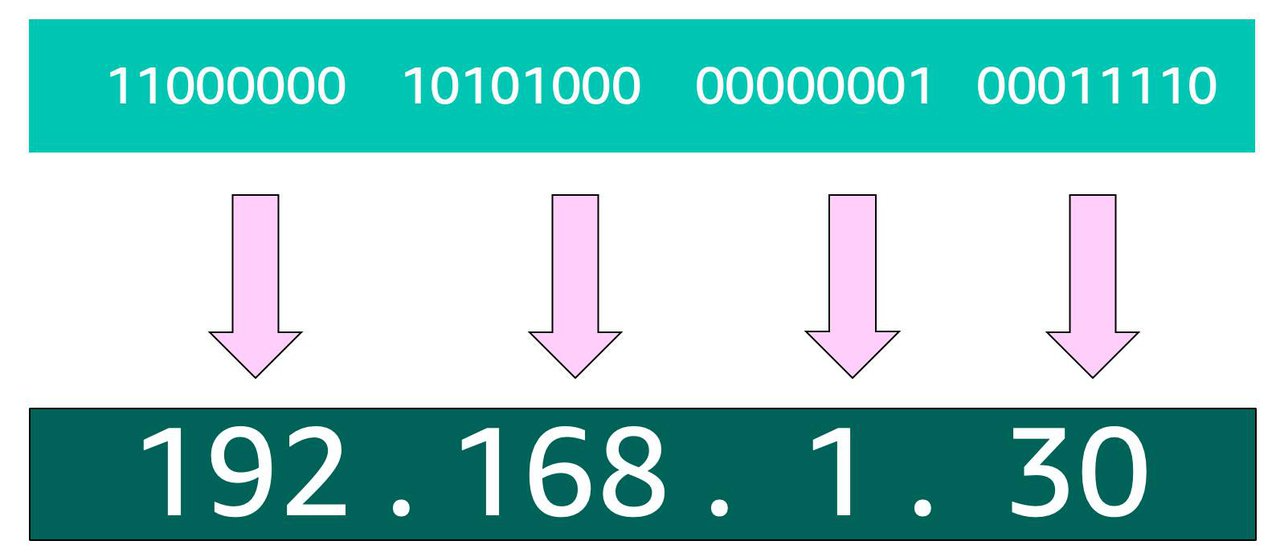
- IPv4 identifies a single host (32 bits → dotted decimal
x.x.x.x). - Networks need ranges, not single IPs → use CIDR.
4.2.1 CIDR Notation (range)
- Format:
STARTING_IP/NUMBER_OF_FIXED_BITS- Example:
192.168.1.0/24→ first 24 bits fixed → 256 IPs (2⁸).
- Example:
- In AWS:
- Smallest VPC/subnet range: /28 = 16 IPs
- Largest VPC range: /16 = 65,536 IPs
- AWS reserves 5 IPs per subnet, so small subnets lose usable space fast.
4.3 AWS VPC
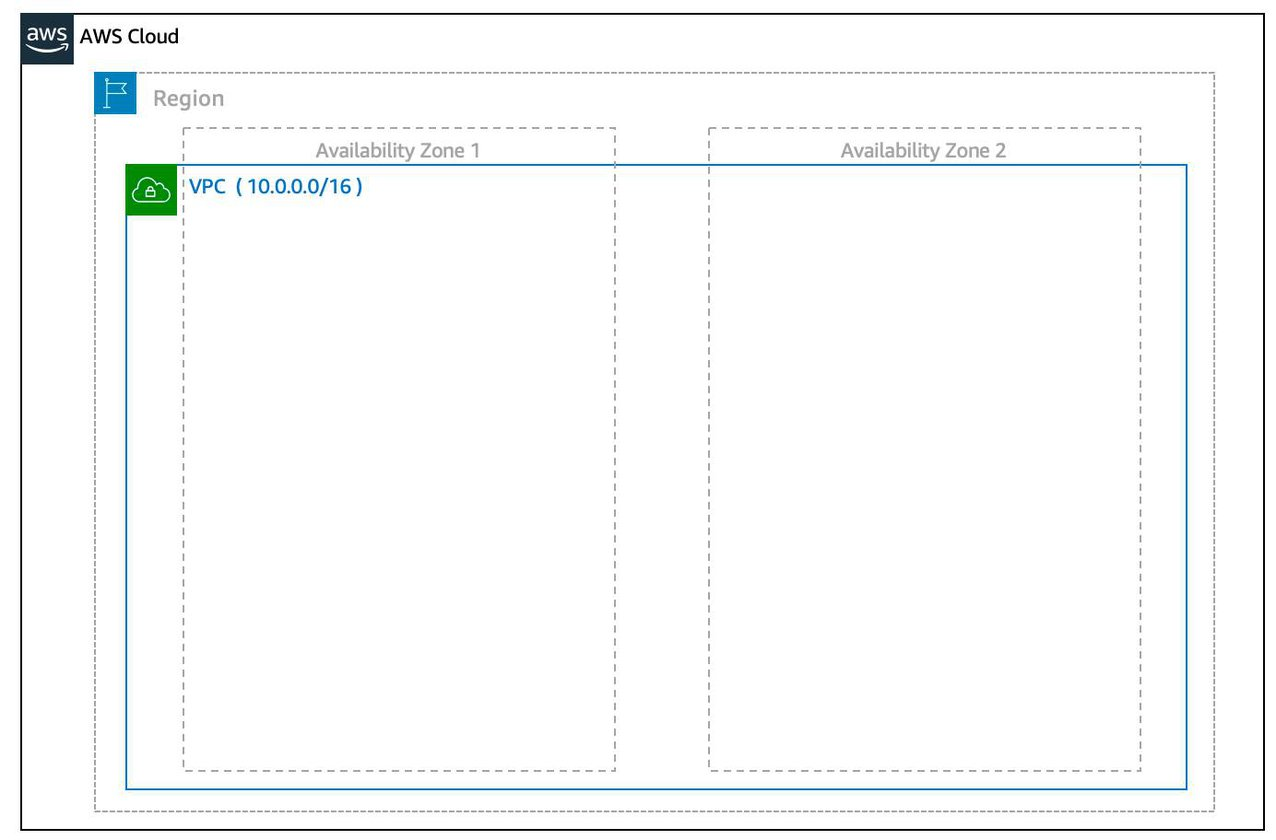
VPC requires:
- Name
- Region (VPC spans multiple AZs in that region)
- CIDR range (VPC size; up to four /16 ranges per VPC)
🧪 CLI: Create a VPC
aws ec2 create-vpc \
  --cidr-block 10.0.0.0/16 \
  --tag-specifications ResourceType=vpc,Tags=[{Key=Name,Value=SampleVpc}]
4.4 Subnets (how you place resources)
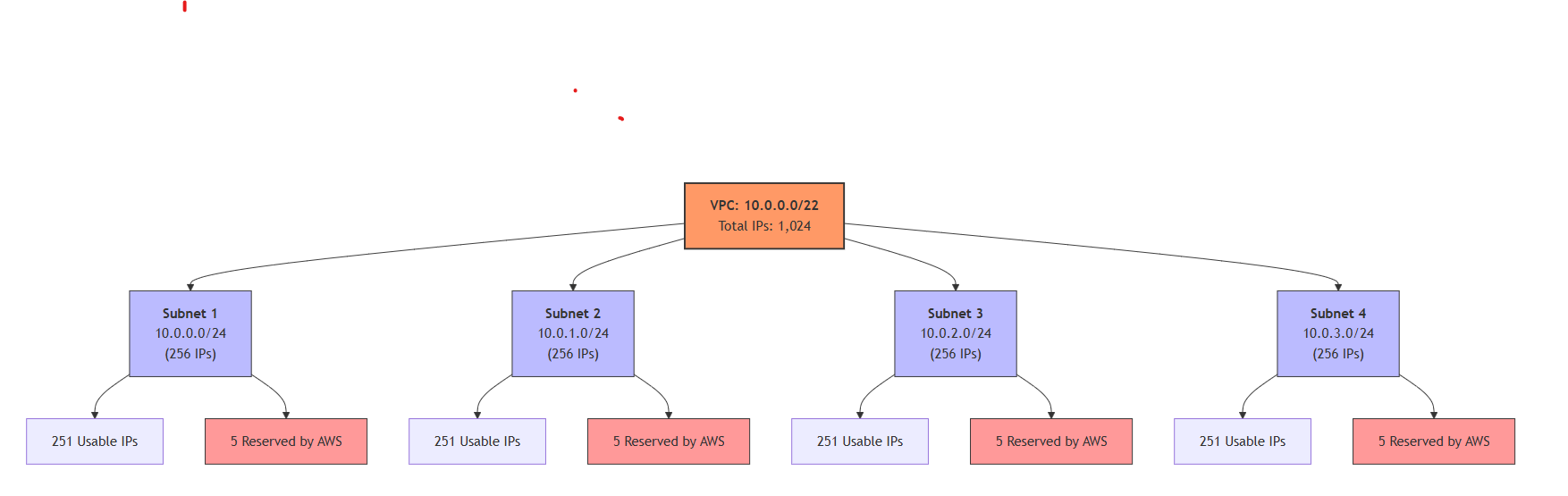
- Subnet = smaller CIDR block inside a VPC, tied to one AZ.
- Subnet CIDR must be a subset of VPC CIDR.
- EC2 instances are launched inside subnets (therefore in a specific AZ).
- For high availability, create at least two subnets in two AZs.
🧪 CLI: Create Subnets (Public + Private)
# Public subnet
aws ec2 create-subnet \
  --vpc-id <vpc-id> \
  --cidr-block 10.0.0.0/24

# Private subnets (in different AZs)
aws ec2 create-subnet \
  --vpc-id <vpc-id> \
  --cidr-block 10.0.1.0/24 \
  --availability-zone ap-south-1a

aws ec2 create-subnet \
  --vpc-id <vpc-id> \
  --cidr-block 10.0.2.0/24 \
  --availability-zone ap-south-1b
💡 Subnets define where resources live (in the cidr-block set of IP addresses allocated to the subnet) and which AZ they belong to.
4.4.1 Reserved IPs in every subnet
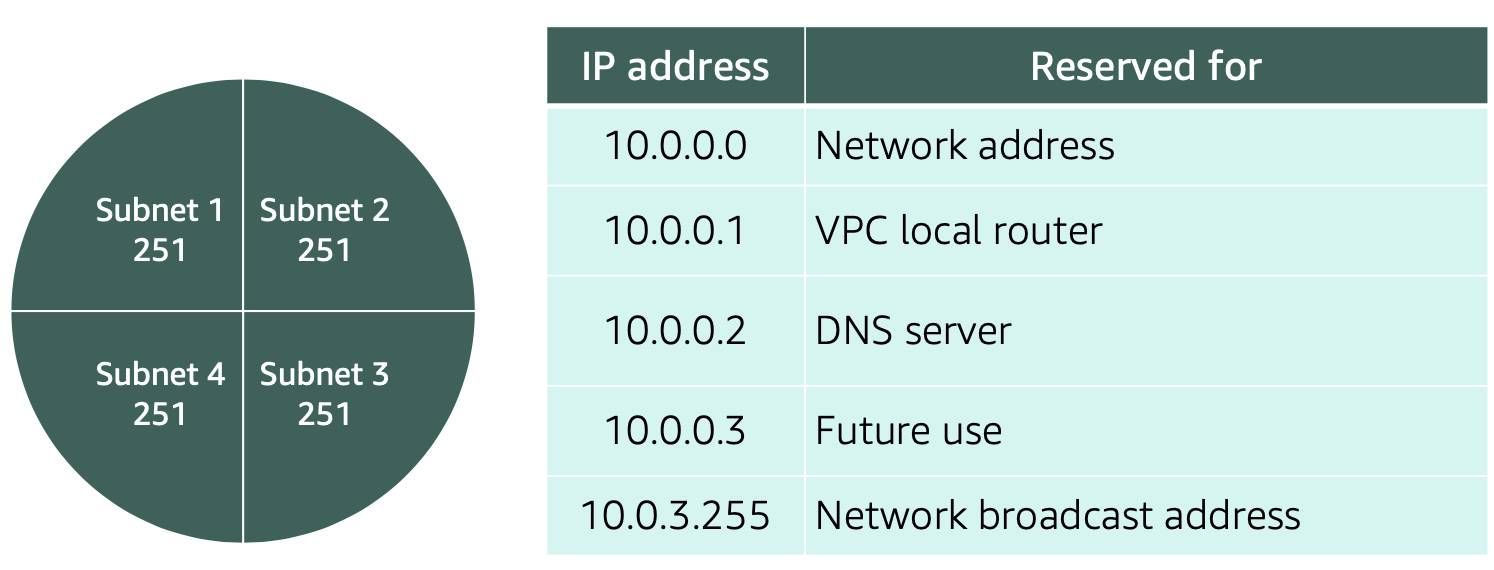
- AWS reserves 5 IP addresses per subnet for routing/DNS/management.
→ Plan subnet sizes with this overhead in mind.
4.5 Public vs Private subnets
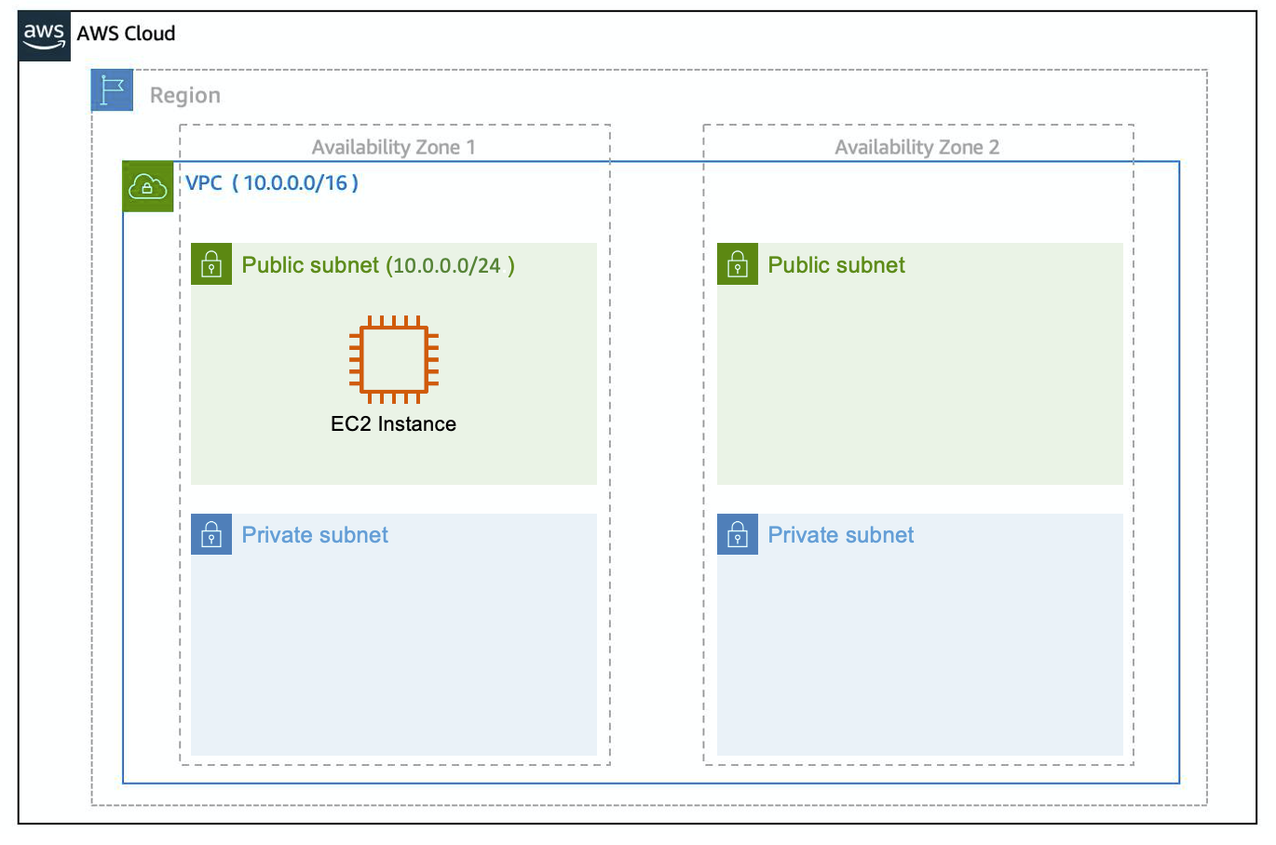
- Public subnet: has a route to an Internet Gateway (IGW).
- Private subnet: no direct IGW route; inbound from internet is blocked by design.
- Common architecture:
- Public: Load balancer
- Private: app servers + databases
- NAT Gateway: private subnet with outbound internet access (updates, external APIs)
4.6 Gateways
4.6.1 Internet Gateway (IGW)
- Enables internet connectivity for the VPC (must be attached to the VPC).
4.6.2 Virtual Private Gateway (VGW)
- Connects VPC to another private network via encrypted VPN (with Customer Gateway on the other side).
🧪 CLI: Internet Gateway + Public Routing
# Create IGW
aws ec2 create-internet-gateway

# Attach IGW to VPC
aws ec2 attach-internet-gateway \
  --internet-gateway-id <igw-id> \
  --vpc-id <vpc-id>

# Create route to internet
aws ec2 create-route \
  --route-table-id <route-table-id> \
  --destination-cidr-block 0.0.0.0/0 \
  --gateway-id <igw-id>
💡 A subnet becomes public only when its route table points to an IGW.
4.6.3 NAT Gateway
- Allows outbound-only internet from private subnets by translating private IP → public IP.
- Stateful return traffic is allowed only for connections initiated from inside.
🧪 CLI: NAT Gateway (Private → Internet Access)
# Allocate Elastic IP
aws ec2 allocate-address

# Create NAT Gateway (must be in public subnet)
aws ec2 create-nat-gateway \
  --subnet-id <public-subnet-id> \
  --allocation-id <elastic-ip-allocation-id>

# Route private subnet traffic via NAT
aws ec2 create-route \
  --route-table-id <private-route-table-id> \
  --destination-cidr-block 0.0.0.0/0 \
  --nat-gateway-id <nat-gateway-id>
💡 NAT enables outbound-only internet from private subnets.
4.7 VPC Routing & Security
4.7.1 Main Route Table

- Default route table created with the VPC.
- Contains routes (Destination → Target).
- Default behavior: allows VPC-local traffic between subnets.
4.7.2 Custom Route Tables
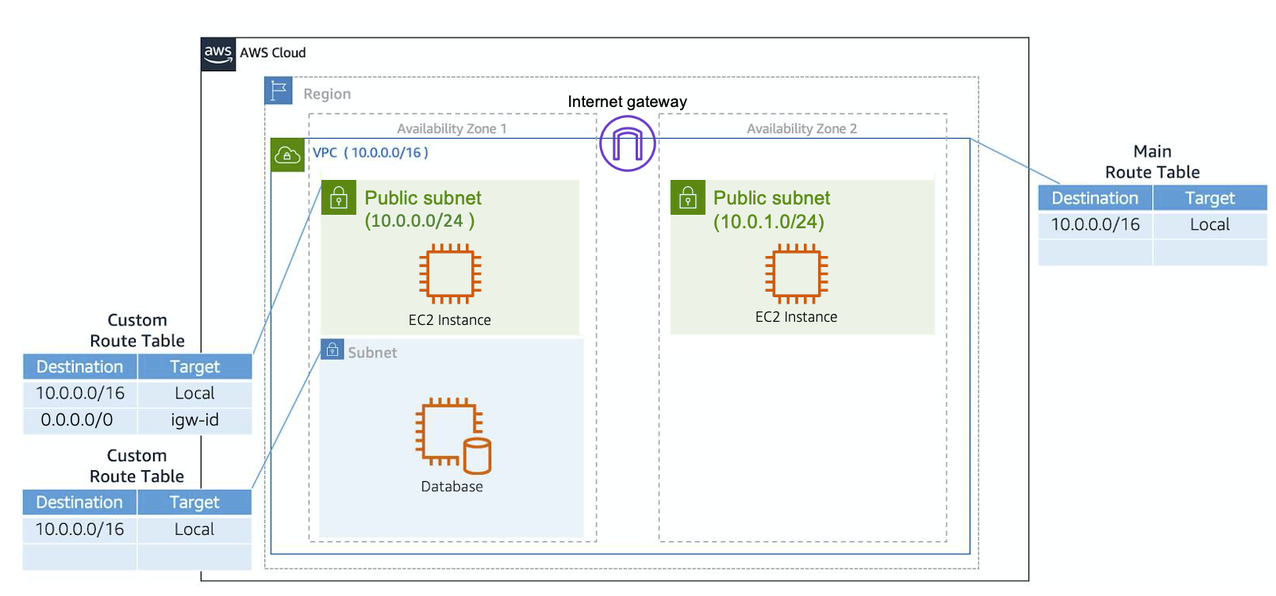
- Route tables can be attached to specific subnets for custom routing.
- If a subnet has a custom route table, it uses that instead of the main route table.
🧪 CLI: Route Table Association
aws ec2 associate-route-table \
  --subnet-id <subnet-id> \
  --route-table-id <route-table-id>
💡 Routing behavior is controlled by which route table a subnet is associated with.
4.7.3 Network ACLs (subnet-level firewall)
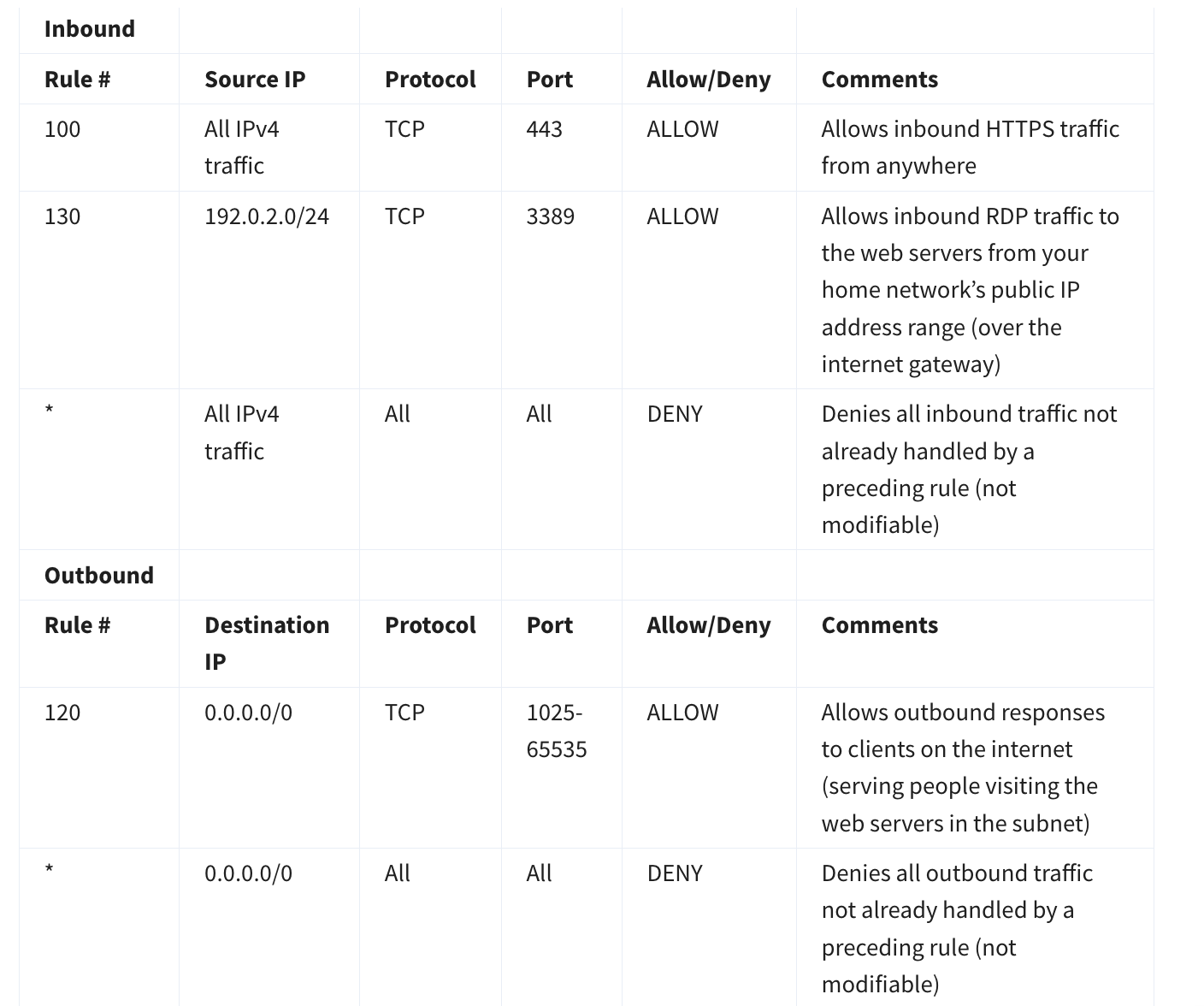
- NACL = stateless subnet firewall.
- Must allow both inbound and outbound explicitly (return traffic isn’t automatic).
- Default vs custom behavior often differs (custom typically starts restrictive).
4.7.4 Security Groups (instance-level firewall)
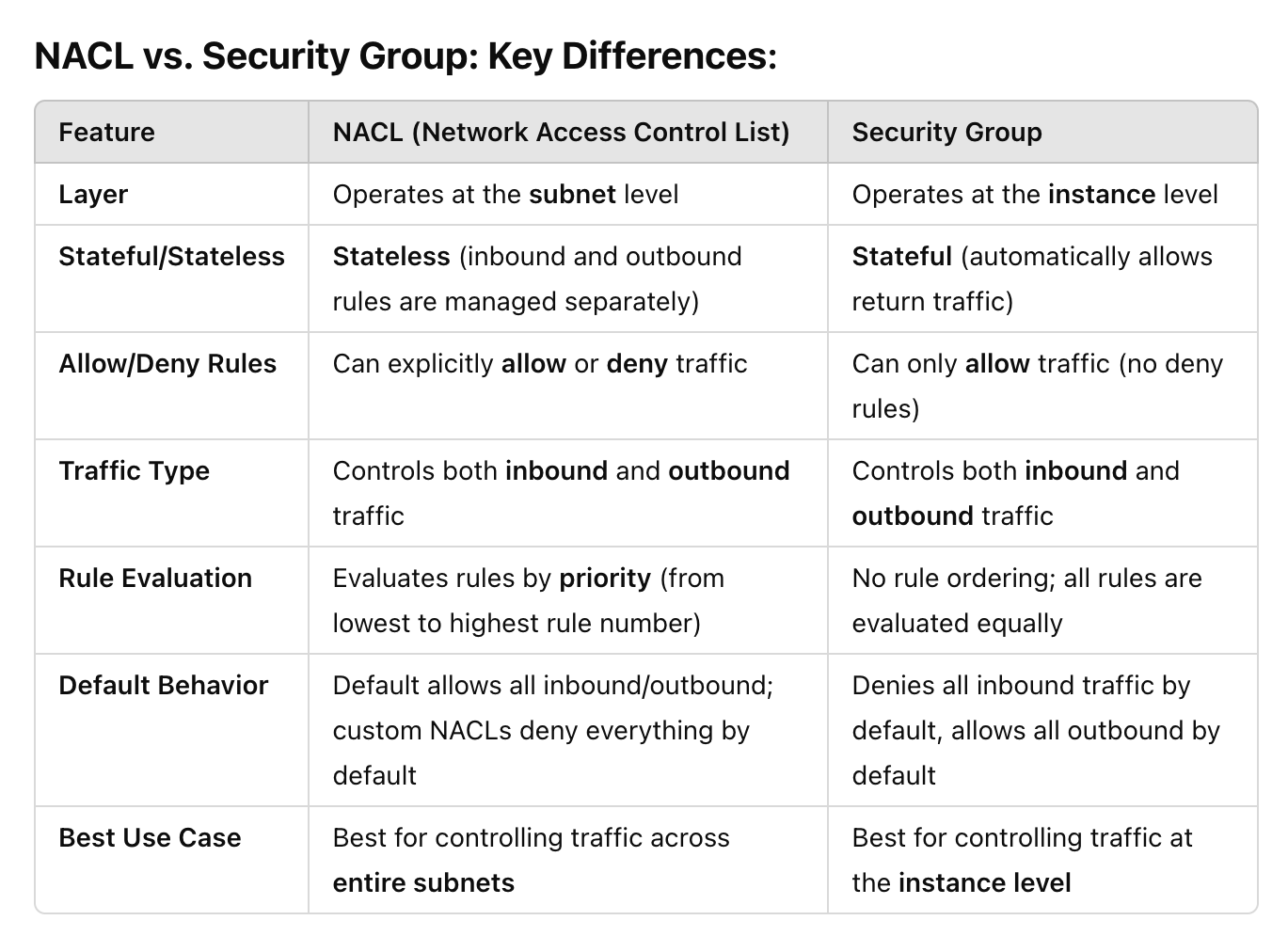
- Security Group = stateful instance firewall.
- Default SG behavior:
- Inbound: deny all
- Outbound: allow all
- For web servers, allow inbound HTTP/HTTPS:
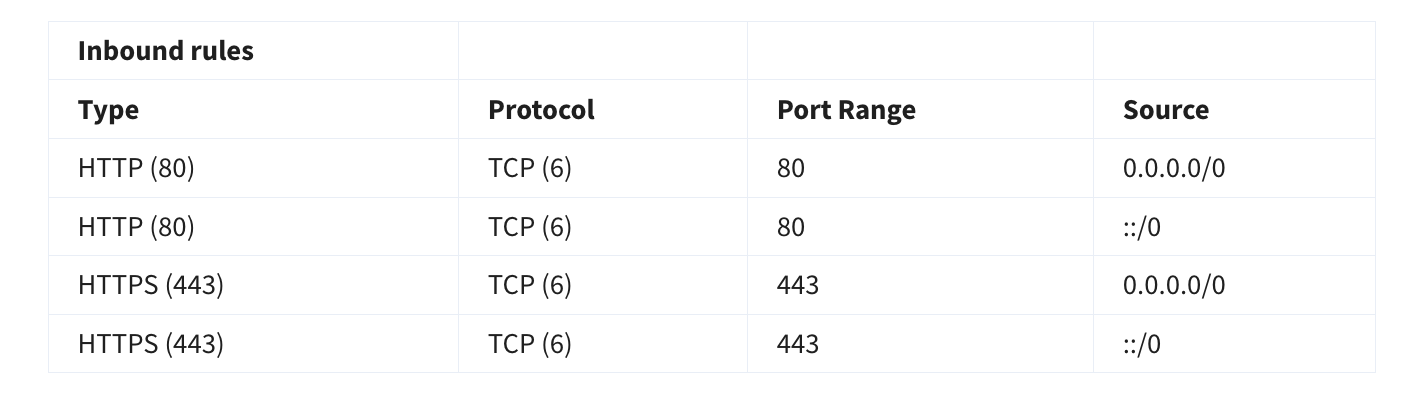
🧪 CLI: Security Group Rules (HTTP/HTTPS)
# Allow HTTP
aws ec2 authorize-security-group-ingress \
  --group-id <sg-id> \
  --protocol tcp \
  --port 80 \
  --cidr 0.0.0.0/0

# Allow HTTPS
aws ec2 authorize-security-group-ingress \
  --group-id <sg-id> \
  --protocol tcp \
  --port 443 \
  --cidr 0.0.0.0/0
💡 Security Groups are stateful — return traffic is automatically allowed.
4.8 Port 80 vs 443 (only what matters)
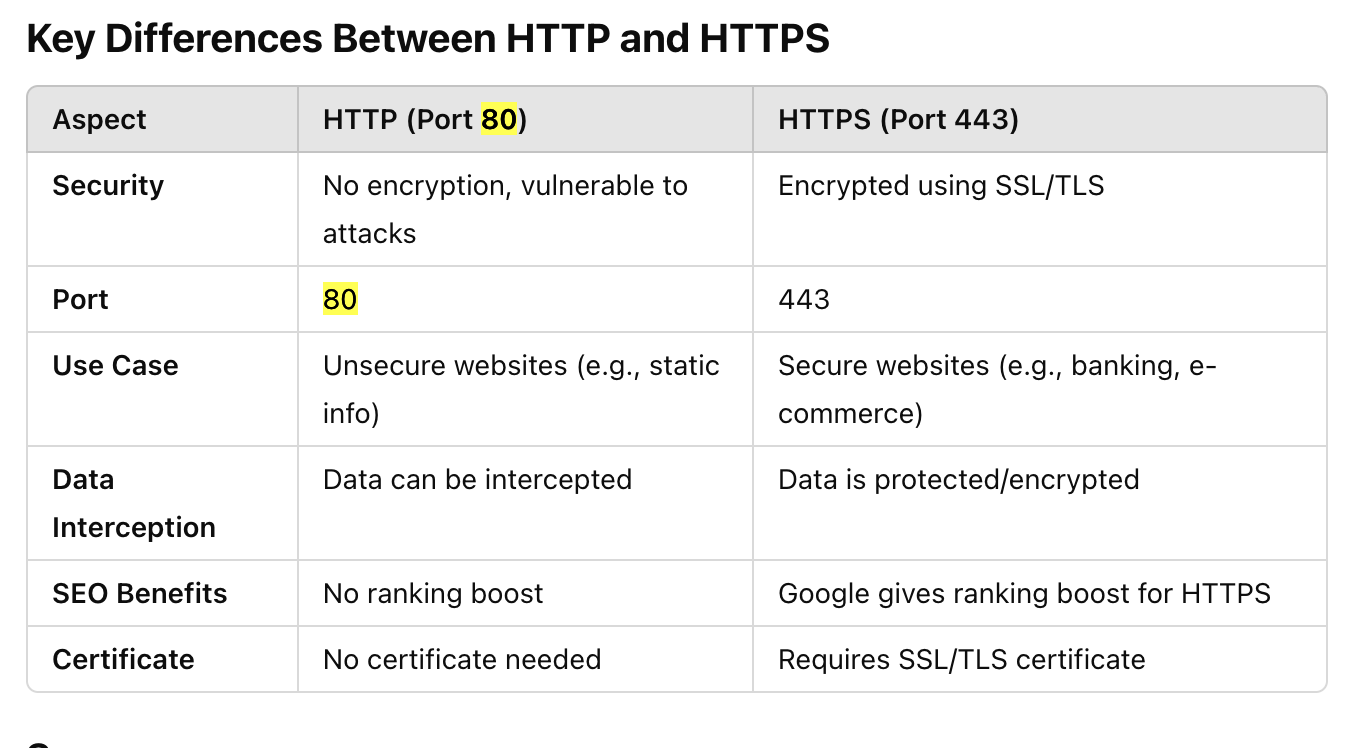
- 80 = HTTP (unencrypted)
- 443 = HTTPS (encrypted via TLS)
4.9 Multi-tier security group isolation (typical 3-tier)

- Web tier: allow internet → web over HTTPS
- App tier: allow web → app over HTTP/needed ports
- DB tier: allow app → DB over DB port (e.g., MySQL 3306)
- This isolates tiers without VLANs (security groups enforce isolation).
4.10 How private-subnet EC2 reaches the internet
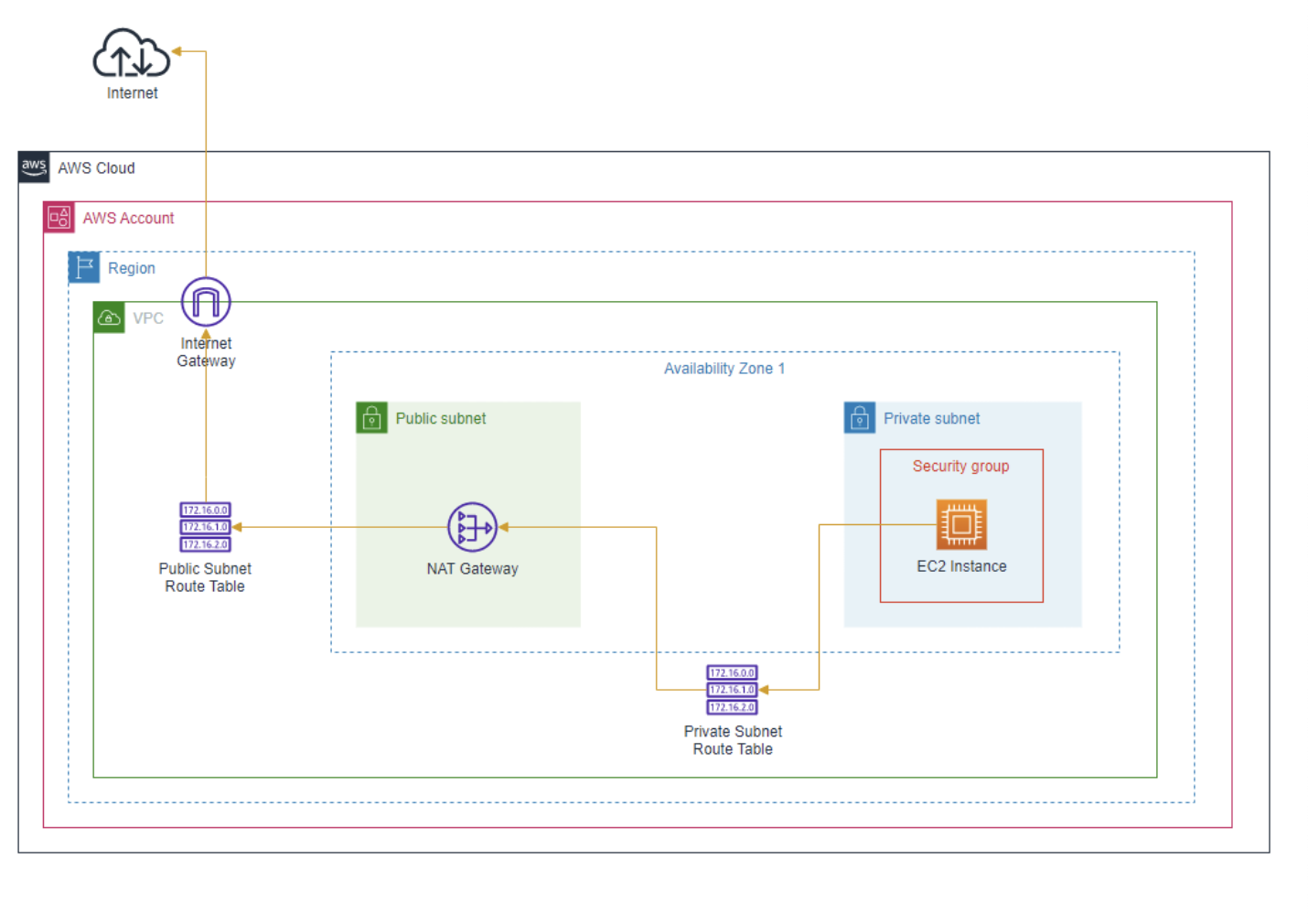
- Private EC2 → routes outbound traffic to NAT Gateway (in a public subnet) → internet.
- No direct inbound internet connectivity to private EC2.
4.10.1 VPC Link & PrivateLink (AWS services reaching into your private VPC)
§4.10 was “private subnet → internet” via NAT. This is the reverse direction: how an AWS-managed service that runs outside your VPC (like API Gateway) reaches a resource that is not internet-facing inside your VPC — without a public IP or an internet-facing load balancer.
- API Gateway runs in AWS’s own network, not inside your VPC — it has no route into your private subnets by default.
- VPC Link is the bridge: an API Gateway resource that privately connects to a target inside your VPC.
- HTTP APIs: VPC Link can target an ALB, NLB, or a Cloud Map service directly.
- REST APIs: VPC Link only supports an NLB target (put an NLB in front if you only have an ALB).
- PrivateLink / interface VPC endpoints are the more general version of this idea: they let traffic reach an AWS service (or another account’s service) via a private ENI in your subnet, instead of going over the internet or through a NAT Gateway.
- Gateway endpoints (S3, DynamoDB only) are a related but separate mechanism — routed via the route table, not an ENI, and free of charge.
🧪 CLI: Create a VPC Link (API Gateway HTTP API → private ALB)
# Create a VPC Link pointing at subnets that can reach the private ALB
aws apigatewayv2 create-vpc-link \
  --name my-vpc-link \
  --subnet-ids subnet-aaaa subnet-bbbb \
  --security-group-ids sg-xxxx

# Create a private integration that uses the VPC Link
aws apigatewayv2 create-integration \
  --api-id <api-id> \
  --integration-type HTTP_PROXY \
  --integration-uri <alb-listener-arn> \
  --connection-type VPC_LINK \
  --connection-id <vpc-link-id>
💡 No VPC Link (or NLB/PrivateLink equivalent) means API Gateway simply cannot reach a private ALB — the ALB would have to be internet-facing instead, which defeats the point of keeping it private.
4.11 Ten VPC troubleshooting checks (public EC2 web app not loading)
- IGW attached to VPC
- Subnet route table has
0.0.0.0/0 → igw - Security Group allows inbound
80/443(and outbound allowed) - NACL allows inbound + outbound for required ports (stateless)
- Instance has a public IP (auto-assign enabled)
- Using correct HTTP vs HTTPS
- User data script ran successfully (
/var/log/cloud-init*) - Instance has correct IAM role permissions (S3/DDB/etc.)
- Your corporate/personal network isn’t blocking access
- App + web server running; check application logs
4.12 Key Notes to Remember
- VPC requires Region, contains AZs and subnets
- Route tables attach to VPC (main) and subnets (custom)
- Public subnet needs IGW + route to IGW
- By default, a
security groupblocks all incoming traffic and allows all outgoing traffic. It is stateful (meaning an result of an incoming traffic is allowed automatically) - NACLs: stateless (must allow inbound + outbound). The
default NACLis associated with all subnets in the VPC by default, allowing all traffic. - CIDR determines network size: /16 larger than /28