flowchart TD
  A[[Temporary<br>Instance Store]]
  B[[Permanent<br>EBS]]
  C(Storage connected<br>to EC2)
  C --> A
  C --> B
05. Storage
👈 Back to: 📝 Blog | 💼 LinkedIn | ✍️ Medium
5.1 AWS Storage Types
❓ How do you choose between S3, EBS, and EFS without guessing?
Hint: Think access pattern, latency vs throughput, and how your application interacts with data.
Three storage types:
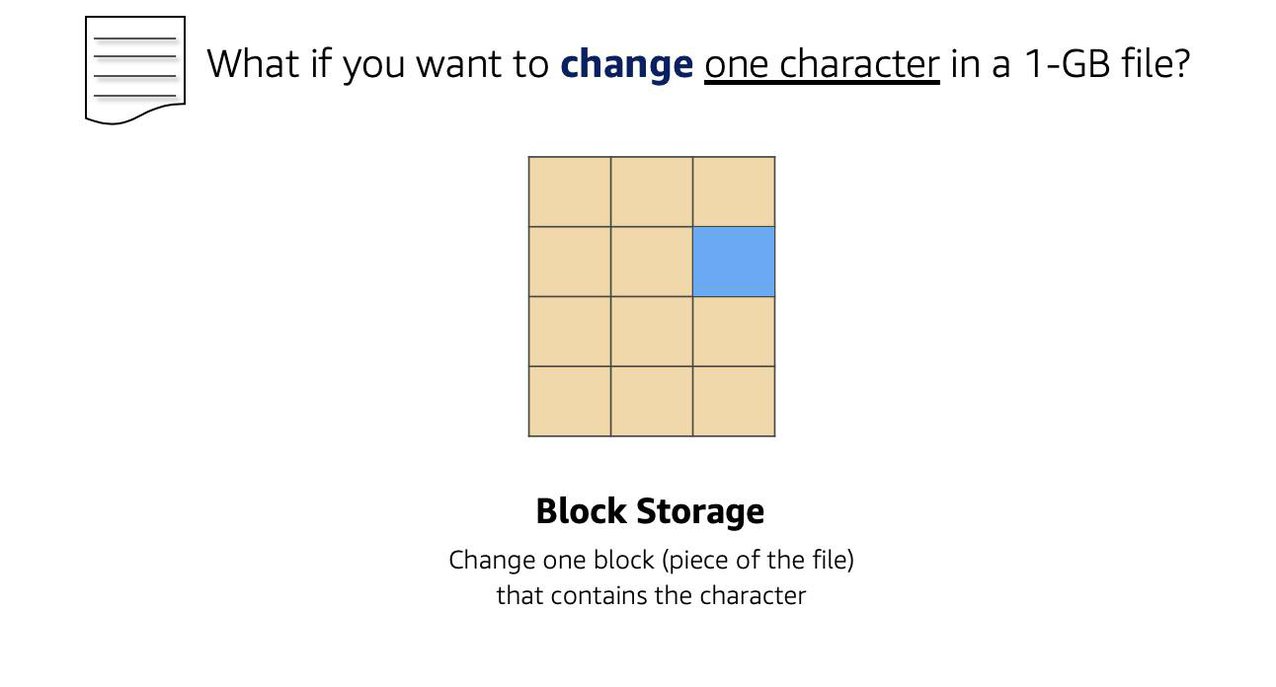
- Block storage: Splits data into fixed-size blocks with addresses → efficient random access; common for OS, DB volumes.
- File storage: Hierarchical directory tree (paths); each file has metadata (name, size, created date). More folders can add latency.
- Object storage: Flat namespace; each object = data + metadata + unique identifier; optimized for scale & throughput.
5.1.1 File Storage
- Structure: Tree-like folders (like traditional file systems).
- Note: Every additional folder adds latency.
- Use cases: large content repositories, dev environments, user home directories.
5.1.2 Block Storage
- Concept: Files split into addressable blocks → efficient retrieval.
- Typically used where low-latency, frequent updates, or OS-level mount semantics are needed.
5.1.3 Object Storage
- Flat structure (no true hierarchy).
- Good for high throughput and massive scale.
- Updating part of an object generally means overwriting the whole object.
File vs Object (from your notes):
- File: hierarchy YES; low-latency R/W; partial edit implies overwrite file; example: Amazon EFS
- Object: flat; high throughput; partial edit implies overwrite object; example: Amazon S3
| File Storage | Object Storge |
|---|---|
| Hierarchy - YES; Folder or tree-like structure | Flat Structure. No hierarchy |
| Good for low-latency read-write | Good for high throughput |
| Edit a portion, you overwrite the whole file | Edit a portion, you overwrite the whole object |
| Amazon EFS | Amazon S3 |
5.2 EC2 Storage Options: Instance Store vs EBS
5.2.1 Two EC2 Instance Storage Options
- Instance Store: ephemeral block storage; good for stateless workloads.
- EBS: persistent block storage; behaves like an external drive that can outlive the instance.
5.2.2 Attachment Relationships (EC2 ↔︎ EBS)
1 EC2 to Many EBS Volumes
- An EBS volume (in the same AZ) can be detached from one EC2 and attached to another.
flowchart LR
  EC[EC2]
  EB1[[EBS 1]]
  EB2[[EBS 2]]
  EB3[[EBS 3]]
  EC --> EB1
  EC --> EB2
  EC --> EB3
1 EBS to 1 EC2 (typical)
flowchart LR
  EC[EC2] --> EB1[[EBS 1]]
1 EBS to Many EC2 (supported for some instances)
flowchart LR
  EB1[[EBS 1]]
  ECA[EC2 A]
  ECB[EC2 B]

  EB1 --> ECA
  EB1 --> ECB
Analogy/limits (from your notes):
- Like an external drive: if compute fails, data can still remain on EBS.
- Volumes have max size limits (scalability bounded per volume).
5.2.3 Scaling EBS Volumes
Two main approaches:
- Increase volume size up to the maximum (16 TB per volume, per your notes).
- Attach multiple volumes to a single EC2 instance (one-to-many).
5.2.4 AMI Types (Instance Store-backed vs EBS-backed)
flowchart TD
  AMI(AMI)
  AMI1[[Instance Store<br>Backed AMI]]
  AMI2[[EBS-Volume<br>backed AMI<br>most common]]
  AMI --> AMI1
  AMI --> AMI2
Key points:
- If an instance running on instance-store backed AMI is stopped, data is lost.
- Instance-store backed AMIs are useful for stateless apps.
- Reboot does not lose instance-store data (stop/hibernate/terminate does).
5.3 Latency vs Throughput (Choosing Storage/Perf Tradeoffs)
Latency = time for one packet to reach destination (important for DB + web interactions)
flowchart LR
  W[Web Server] -- 1 packet sent<br> in 10 millisec --> C[Client]
Throughput = number of packets delivered per second (important for big data)
flowchart LR
  W[Web Server] -- 10 packets sent<br> in 1 sec --> C[Client]
5.4 EBS Volume Types (SSD vs HDD) + Fit-to-Workload
Rule of thumb (from your table):
- Provisioned IOPS SSD → very low latency (databases, payment systems)
- General Purpose SSD → low latency (web servers, general transactional workloads)
- Throughput Optimized HDD → very high throughput (big data)
- Cold HDD → infrequently accessed; can tolerate higher latency, still may need throughput for transfers
Key point: SSDs are faster and more expensive than HDDs.

5.4.1 EBS Snapshots (Backups)
- Incremental backups
- First snapshot stores full data
- Later snapshots store only changed blocks
5.5 Amazon S3 (Object Storage)
5.5.1 What S3 Is
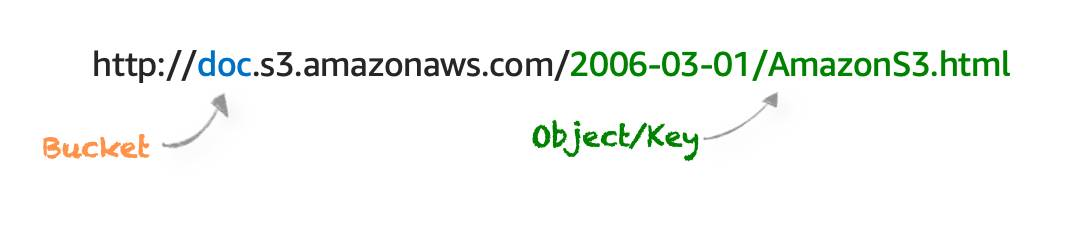
- S3 is object storage: flat structure, objects addressed via unique identifiers.
- Object = file + metadata (store as many as needed).
5.5.2 S3 URL/Structure
5.5.3 S3 Security
- Everything is private by default
- You can make buckets/folders/objects public, but typical best practice is granular access.
- Two main access controls:
- IAM policies
- S3 bucket policies
When to use S3 bucket policies (per your notes):
- Simple cross-account access without IAM roles
- IAM policy size limit constraints (bucket policies support larger size)
Bucket policies apply to buckets only, not folders/objects.
5.5.4 S3 Encryption
- Encryption in transit and at rest
- Server-side encryption: S3 encrypts before storing; decrypts on download
- Client-side encryption: you encrypt before upload and manage keys/tools
5.5.5 S3 Versioning
- Helps recover from accidental delete/overwrite
- Delete puts a delete marker (object not immediately removed); remove marker to restore
- Overwrite creates a new version; older versions remain accessible
Bucket states:
- Unversioned (default)
- Versioning-enabled
- Versioning-suspended (no new versions, old versions remain)
5.5.6 S3 Storage Classes
- S3 Standard: frequent access; low latency/high throughput; higher cost; 11-nines durability
- S3 Intelligent-Tiering: unpredictable access; auto-moves between frequent/infrequent tiers; small overhead
- S3 Standard-IA: infrequent but rapid access; lower storage cost, higher retrieval cost
- S3 One Zone-IA: infrequent, single-AZ redundancy; cheaper; lower availability
- S3 Glacier: archival; minutes to hours retrieval; very low storage cost
- S3 Glacier Deep Archive: lowest cost; retrieval up to ~12 hours
- S3 Outposts: on-prem S3 for local residency/low latency needs
5.5.7 Lifecycle Management (Automate Cost Control)
Lifecycle policies can automate:
- Transition (move between storage classes)
- Expiration (permanent deletion)
Good candidates:
- Periodic logs (keep 1 week/month then delete)
- Data whose access frequency decreases over time (hot → warm → archive → delete)
5.6 Storage Services Recap
- EC2 Instance Store: ephemeral block storage; for stateless apps; persists through reboot, not through stop/hibernate/terminate.
- EBS: persistent; supports resizing + snapshots; SSD for I/O sensitive, HDD for throughput intensive.
- S3: object storage; pay-as-you-go; replicated across multiple AZs; not attached to compute.
- EFS / FSx: serverless file services; no upfront provisioning; pay for use.
5.7 Key Takeaways
- Max single S3 object size: 5 TB (good for media/video hosting).
- EBS fits high-transaction relational DB storage layers.
- Instance store data persists on reboot, not on stop/hibernate/terminate.
- S3 Standard-IA vs Glacier Deep Archive:
- IA when rarely accessed but needs quick retrieval
- Deep Archive when rarely accessed and retrieval delay is acceptable (often for compliance/legal retention)
- Block storage is best when only a small portion of a file changes.