%%{init: {'theme': 'base', 'themeVariables': {'primaryColor': '#E3F2FD', 'primaryBorderColor': '#1E88E5', 'lineColor': '#424242', 'fontSize': '14px'}}}%%
flowchart LR
  U[Customers] --> W[Web tier]
  W --> O[Monolithic order service]
  O --> M[(MySQL)]
  O -.-> I[Inventory service]
  O -.-> A[Accounting service]
  O -.-> F[Fulfillment service]

  subgraph InScope["In scope for Migration"]
    W
    O
    M
  end

  subgraph OutOfScope["Out of scope"]
    I
    A
    F
  end
10. Architecting a Serverless Web Backend
👈 Back to: 📝 Blog | 💼 LinkedIn | ✍️ Medium
How to Architect a Serverless Web Backend Solution in AWS
- ❓ Key Question of this chapter: Given a workload, how do we decide which serverless services to combine and how do we defend the ones you rejected?
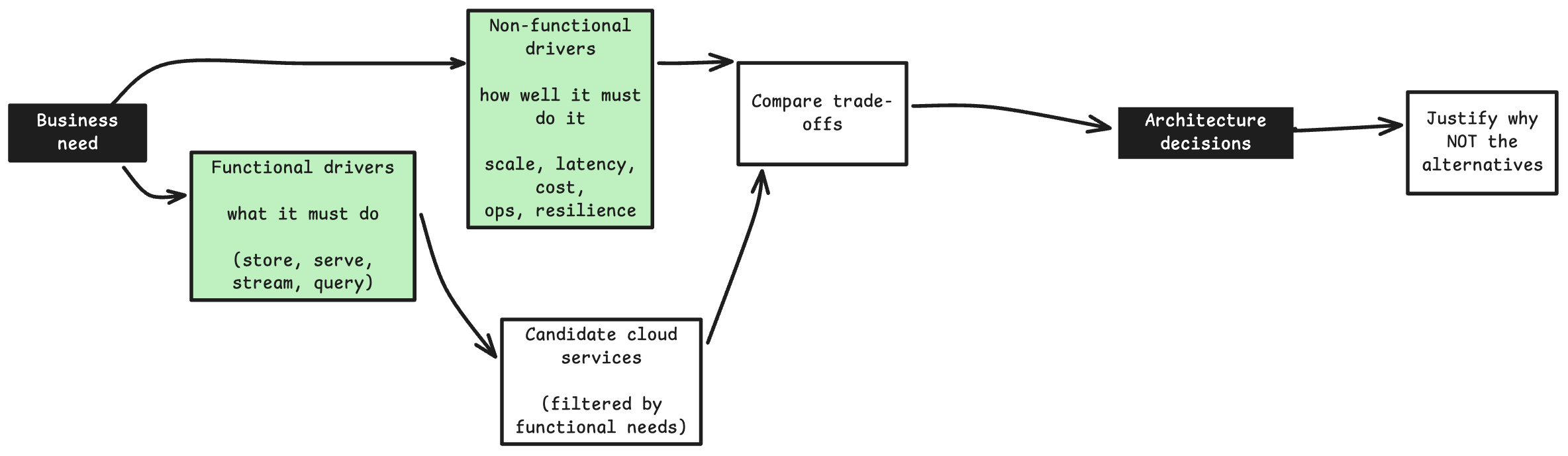
- Workflow followed in all chapters: requirements → architectural drivers → candidate services → trade-offs → decision → justified rejections.
Running example used throughout this chapter
An online retailer runs an on-prem monolithic order service (web servers + a MySQL database) that calls downstream inventory, accounting and fulfillment services. It crashes under spiky load, is tightly coupled, and has data inconsistencies.
Goal: re-architect it on AWS for auto-scaling, decoupling, low operational overhead, and cost/performance efficiency.
In scope: the web tier, the order service, and the database. Out of scope: payment processing and the downstream services themselves.
10.1 The Method: nine steps to a serverless architecture
Every serverless design in this chapter follows the same reasoning chain. The valuable skill is the chain and the rejected options, not memorising service features — multiple valid solutions always exist.
| Step | Question the architect answers | Section |
|---|---|---|
| 1 | What are the real architectural drivers? | 10.2 |
| 2 | How do clients get in? | 10.3 |
| 3 | Server:What runs the business logic? | 10.4 |
| 4 | Data: Where does state live? | 10.5 |
| 5 | How do components stay decoupled? | 10.6 |
| 6 | How do we absorb bursts and cut latency? | 10.7 |
| 7 | How is every hop secured? | 10.8 |
| 8 | Logging: How do we see what is happening? | 10.9 |
| 9 | Optimization: How do we tune cost and performance? | 10.10 |
Architect’s takeaway: Do the steps in order. Choosing compute before understanding drivers is how teams end up with a serverless monolith.
10.2 Turn requirements into architectural drivers
- ❓ How do you convert a customer’s complaints into design constraints?
The customer’s words map cleanly onto architectural drivers:
| Customer pain / want | Architectural driver | Implication |
|---|---|---|
| Crashes under spiky demand | Scalability + elasticity | Prefer serverless / managed auto-scaling |
| Tightly coupled monolith, cascading failures | Decoupling + resilience | Event-driven, async, remove single points of failure |
| Wants low maintenance | Operational efficiency | Managed services, no server fleet to run |
| Overprovisioning is wasteful | Cost efficiency | Pay-per-use, no idle resources |
| Wants unified monitoring | Observability | Native CloudWatch integration everywhere |
| Simple order data, basic CRUD | Right-sized data store | NoSQL key-value, not an enterprise RDBMS |
%%{init: {'theme': 'base', 'themeVariables': {'primaryColor': '#E3F2FD', 'primaryBorderColor': '#1E88E5', 'lineColor': '#424242', 'fontSize': '14px'}}}%%
flowchart TD
    M["On-prem monolith<br>web servers + MySQL"] --> P1["Spiky, unpredictable load"]
    M --> P2["Tight coupling<br>cascading failures"]
    M --> P3["High ops overhead"]
    P1 --> S1["Serverless +<br>managed auto-scaling"]
    P2 --> S2["Event-driven decoupling"]
    P3 --> S3["Fully managed services"]
    S1 --> ARCH["Serverless<br>event-driven backend"]
    S2 --> ARCH
    S3 --> ARCH
Signals that point towards serverless
- Spiky, unpredictable or low-average traffic (idle capacity would be wasted).
- Event-driven work that finishes quickly.
- Small team, no appetite for patching servers.
- Simple, well-understood data access patterns.
Signals that point away from serverless — see 10.12.
Architect’s takeaway: Spiky demand + simple data + a low-ops preference is almost a textbook signal for serverless.
10.3 Design the front door
- ❓ What sits between the internet and your business logic?
Chosen: Amazon API Gateway. It fronts the backend so compute is never exposed directly to the open internet, and it absorbs the plumbing you would otherwise hand-write into a web server.
%%{init: {'theme': 'base', 'themeVariables': {'primaryColor': '#E3F2FD', 'primaryBorderColor': '#1E88E5', 'lineColor': '#424242', 'fontSize': '14px'}}}%%
flowchart LR
    C["Clients<br>web / mobile"] --> AG["Amazon API Gateway"]
    AG --> A1["AuthN / AuthZ"]
    AG --> A2["Throttling &<br>rate limiting"]
    AG --> A3["Request validation<br>& transformation"]
    AG --> A4["CORS, stages,<br>canary releases"]
    A1 --> BE["Backend integration"]
    A2 --> BE
    A3 --> BE
    A4 --> BE
What API Gateway removes from your code: authentication, throttling, request validation, CORS, traffic management, versioning — all at scale, billed per call.
Decisions to make at the front door
| Decision | Options | Prefer when |
|---|---|---|
| API flavour | REST API vs HTTP API vs WebSocket API | HTTP API for simple, low-latency, low-cost proxying; REST API when you need request validation, API keys, usage plans, WAF |
| Authorisation | IAM, Amazon Cognito, Lambda authorizer | Cognito for end-user sign-in; IAM for service-to-service; Lambda authorizer for custom/3rd-party tokens |
| Integration target | Lambda, or a direct service integration to DynamoDB / SQS / Step Functions | Skip Lambda entirely when the request needs no business logic |
Key nuance: API Gateway can integrate directly with DynamoDB or SQS without a Lambda in the middle. That removes a whole compute hop, its cold start, and its cost — this is the basis of the storage-first pattern in 10.7.
10.3.1 The front door is compute-agnostic
- ❓ Can the frontend hit one endpoint without knowing whether Lambda or Fargate runs behind it?
Yes — and that is the entire point of an API façade. The client gets one stable HTTPS contract; the compute behind it is an implementation detail you can swap later without touching the frontend.
The mechanics differ, though. Lambda is invoked by API Gateway. ECS/Fargate tasks are long-running containers in a VPC, so API Gateway must reach them through a load balancer.
%%{init: {'theme': 'base', 'themeVariables': {'primaryColor': '#E3F2FD', 'primaryBorderColor': '#1E88E5', 'lineColor': '#424242', 'fontSize': '14px'}}}%%
flowchart LR
    FE["Frontend<br>one stable HTTPS endpoint"] --> APIGW["API Gateway"]
    APIGW -->|"Option A: HTTP integration"| ALB["Application Load Balancer<br>public"]
    APIGW -->|"Option B: private<br>integration"| VL["VPC Link"]
    VL --> NLB["Internal NLB / ALB"]
    ALB --> F["ECS Fargate tasks"]
    NLB --> F
| Approach | How it works | Prefer when |
|---|---|---|
| HTTP proxy → public ALB | API Gateway forwards to an internet-facing ALB in front of Fargate | Simplest — but the ALB is publicly reachable |
| VPC Link → private NLB (REST API) | API Gateway connects privately into your VPC to an internal NLB → Fargate | You want Fargate kept private, never internet-exposed |
| VPC Link v2 → internal ALB (HTTP API) | HTTP API’s VPC Link targets a private ALB | Modern, cheaper HTTP APIs with private path-based routing |
VPC Link is the key piece — it is what lets API Gateway (a managed, public-facing service) securely reach containers on private subnets, so Fargate tasks never need a public IP.
Mixing compute behind one API. Routing is per-route, so a single domain can fan out to different compute types:
%%{init: {'theme': 'base', 'themeVariables': {'primaryColor': '#E3F2FD', 'primaryBorderColor': '#1E88E5', 'lineColor': '#424242', 'fontSize': '14px'}}}%%
flowchart LR
    FE["Frontend"] --> APIGW["API Gateway<br>single domain"]
    APIGW -->|"/orders"| F["Fargate on ECS"]
    APIGW -->|"/notify"| L["Lambda"]
    APIGW -->|"/legacy"| ALB2["ALB to EC2"]
The client calls api.company.com/orders and api.company.com/notify identically, while one route hits a container and the other a function. That makes strangler-fig migration possible: move endpoints off the monolith one at a time with zero frontend changes.
Caveats to flag before you commit
| Caveat | Detail |
|---|---|
| 29-second integration timeout | API Gateway caps any integration at ~29 s. Long-running work must go async (queue + poll), exactly as Lambda’s 90-min cap forces |
| Extra hop, extra cost | API Gateway → VPC Link → load balancer → task adds latency and components versus exposing the ALB directly |
| Two scaling models | Lambda scales per request automatically; Fargate scales via ECS service auto-scaling (task count). You now own container-tier capacity planning |
| Idle cost | Fargate tasks run continuously — you pay at low traffic too (mitigate with a low minimum task count) |
| Sometimes unnecessary | If you only need a load-balanced HTTPS endpoint with no auth/throttling/keys/versioning, an ALB alone may be enough |
Architect’s takeaway: API Gateway is the managed “front door”. Every feature it provides is a feature you do not have to build, secure, scale or patch — and because it is compute-agnostic, it becomes the seam along which you can later change your mind about compute.
10.4 Choose the compute
- ❓ Lambda, containers or EC2 — and how do you defend the rejection?
%%{init: {'theme': 'base', 'themeVariables': {'primaryColor': '#E3F2FD', 'primaryBorderColor': '#1E88E5', 'lineColor': '#424242', 'fontSize': '14px'}}}%%
flowchart TD
    W["Order service compute"] --> Q1{"Need OS or<br>infra-level control?"}
    Q1 -->|Yes| EC2["EC2 / Elastic Beanstalk<br>REJECTED: ops overhead,<br>idle cost under spiky load"]
    Q1 -->|No| Q2{"Team has container skills<br>and wants containers?"}
    Q2 -->|Yes| ECS["ECS / EKS on Fargate<br>REJECTED: viable, but<br>no container expertise"]
    Q2 -->|No| Q3{"Finishes in under 15 min<br>and is event-driven?"}
    Q3 -->|Yes| L["AWS Lambda - CHOSEN"]
    Q3 -->|No| ELSE["Fargate / Batch /<br>Step Functions orchestration"]
Chosen: AWS Lambda
- Fully serverless: scales to zero, pay-per-use, no idle resources.
- Native CloudWatch logging and metrics.
- Event-driven by nature — it runs on triggers, not continuously.
- The customer was already familiar with serverless and willing to rewrite the code.
Rejected — and why
| Rejected option | Technically viable? | Reason for rejection |
|---|---|---|
| EC2 / Elastic Beanstalk | Yes | Operational overhead (patching, scaling policies, AMIs); idle capacity is costly under spiky demand |
| ECS / EKS on Fargate | Yes — Fargate is serverless containers | Team had no container expertise and did not want to adopt containers. Adoption cost outweighed the fit |
Lambda constraints you must design around
- 90-minute maximum execution. Anything longer needs Fargate, Batch, or decomposition behind Step Functions.
- No OS access; the runtime and patching are AWS’s responsibility.
- Stateless execution environments — reused for a while, then torn down (see 10.10.1).
- Cold starts on the first invocation into a new environment.
- Concurrency limits per account/region; a runaway Lambda can starve other functions unless you set reserved concurrency.
For the wider compute landscape (EC2 families, containers, scaling), see 03. Compute.
Architect’s takeaway: Reject a technically-valid option (Fargate) when team skills and adoption cost outweigh the technical fit. Constraints are never only technical.
10.4.1 What changes if you pick Fargate instead of Lambda?
- ❓ If Fargate is chosen, must the monolith still be decomposed?
No — and this is one of the most under-appreciated points in serverless design.
Lambda’s constraints (90-minute cap, statelessness, event triggers, one deployable per function) implicitly force decomposition. Fargate has none of them: it runs a long-lived container with your existing process model, in-memory state and background threads, with the code largely untouched.
%%{init: {'theme': 'base', 'themeVariables': {'primaryColor': '#E3F2FD', 'primaryBorderColor': '#1E88E5', 'lineColor': '#424242', 'fontSize': '14px'}}}%%
flowchart TD
    Choice{"Chosen compute?"}
    Choice -->|Lambda| Force["Constraints force decomposition<br>90-min cap, stateless,<br>per-function deploy"]
    Choice -->|Fargate| Free["No such constraints<br>run the monolith as one container"]
    Force --> Micro["Multiple small functions"]
    Free --> Mono["Containerise the monolith as-is<br>re-platform / lift and shift"]
So “container vs function” and “monolith vs microservices” are two independent decisions. Lambda conflates them; Fargate un-conflates them.
What you gain by not splitting (yet)
| Benefit | Why it matters |
|---|---|
| Fast, low-risk migration | Wrap the existing code in a Dockerfile and run it. No rewrite |
| Immediate infrastructure wins | Auto-scaling, managed infra, no patching, CloudWatch — without touching business logic |
| In-process calls stay in-process | Modules call each other as function calls (fast, transactional) instead of network hops |
| Smaller operational surface | One service to deploy, monitor and trace — not eight services plus queues and discovery |
| Deferred complexity | You avoid the distributed-systems tax (eventual consistency, retries, partial failures) until it is actually justified |
Microservices are an organisational and scaling tool, not a default. A modular monolith on Fargate is a legitimate modern target.
What containerising does not fix
%%{init: {'theme': 'base', 'themeVariables': {'primaryColor': '#E3F2FD', 'primaryBorderColor': '#1E88E5', 'lineColor': '#424242', 'fontSize': '14px'}}}%%
flowchart LR
    Mono["Monolith on Fargate"] --> P1["Scales as ONE unit<br>scale everything even if<br>only orders is hot"]
    Mono --> P2["One deploy = whole app<br>small change, full redeploy risk"]
    Mono --> P3["Tight coupling remains<br>a bug in one module<br>kills the whole task"]
    Mono --> P4["Shared failure domain"]
Containerising solves infrastructure and operations pain. It does not solve architectural coupling pain — and coupling/cascading failure was a stated problem in this use case. If independent scaling and blast-radius isolation are real drivers, lift-and-shift is a stepping stone, not the destination.
The pragmatic sequence
%%{init: {'theme': 'base', 'themeVariables': {'primaryColor': '#E3F2FD', 'primaryBorderColor': '#1E88E5', 'lineColor': '#424242', 'fontSize': '14px'}}}%%
flowchart LR
    A["1. Containerise the monolith<br>on Fargate - re-platform"] --> B["2. Enforce internal modularity<br>modular monolith"]
    B --> C["3. Extract ONLY the hot or<br>high-change module when justified"]
    C --> D["4. Strangler-fig behind API Gateway<br>route by route"]
Steps 3–4 are painless precisely because of the compute-agnostic façade in 10.3.1: carve out one endpoint into its own service only when a specific driver demands it — that module scales differently, changes often, or needs failure isolation.
Architect’s takeaway: Choose Fargate + monolith to de-risk a migration, then decompose reactively, driven by evidence — not reflexively. Do not pay the distributed-systems tax before the business problem demands it.
10.5 Choose the data store
- ❓ NoSQL or relational — and what breaks if you get it wrong behind Lambda?
%%{init: {'theme': 'base', 'themeVariables': {'primaryColor': '#E3F2FD', 'primaryBorderColor': '#1E88E5', 'lineColor': '#424242', 'fontSize': '14px'}}}%%
flowchart TD
    D["Order data store"] --> Q1{"Complex SQL,<br>joins, transactions<br>across tables?"}
    Q1 -->|Yes| Q2{"Enterprise-scale<br>relational features?"}
    Q2 -->|Yes| AUR["Aurora Serverless v2<br>+ RDS Proxy"]
    Q2 -->|No| RDS["Amazon RDS<br>+ RDS Proxy"]
    Q1 -->|"No - simple CRUD lookups"| DDB["Amazon DynamoDB - CHOSEN"]
Chosen: Amazon DynamoDB — serverless key-value NoSQL. The order record is a simple lookup by key, basic CRUD, no joins. It auto-scales storage and throughput, encrypts at rest, and needs no capacity planning in on-demand mode.
| Factor | DynamoDB | Aurora Serverless v2 |
|---|---|---|
| Data model | Key-value / document (NoSQL) | Relational (MySQL / PostgreSQL) |
| Queries | Simple CRUD, no joins | Complex SQL, joins, reporting |
| Fit with Lambda | Native HTTPS API, no connection management | Often needs RDS Proxy for connection pooling |
| Scaling | Serverless, on-demand throughput | Auto-scales capacity units |
| Networking | Regional endpoint, not inside your VPC | Deployed into your VPC subnets |
| Prefer when | Simple, high-concurrency lookups | Complex relational workloads |
The connection-exhaustion trap
Lambda scales horizontally to thousands of concurrent environments. Each environment holding an open database connection will exhaust a relational database’s connection limit almost immediately.
%%{init: {'theme': 'base', 'themeVariables': {'primaryColor': '#E3F2FD', 'primaryBorderColor': '#1E88E5', 'lineColor': '#424242', 'fontSize': '14px'}}}%%
flowchart LR
    subgraph Bad["Naive"]
        L1["1000s of concurrent<br>Lambda environments"] -->|1 connection each| DB1["RDS / Aurora<br>connection limit hit"]
    end
    subgraph Good["Two safe options"]
        L2["Lambda"] -->|pooled| PX["RDS Proxy"] --> DB2["RDS / Aurora"]
        L3["Lambda"] -->|"stateless HTTPS API"| DDB["DynamoDB"]
    end
Design rules for DynamoDB
- Model the access patterns before creating the table. Unlike SQL, you cannot bolt on arbitrary queries later without pain.
- Use secondary indexes (LSI/GSI) to query non-key attributes.
- Choose a partition key with high cardinality to avoid hot partitions.
- DynamoDB Streams turn every write into an event — the basis of step 5.
More depth on picking a database and on DynamoDB’s placement relative to your VPC: 06. Databases.
Architect’s takeaway: Prefer NoSQL when there are no joins and the access patterns are known up front. DynamoDB + Lambda sidesteps the connection-exhaustion problem entirely; if you truly need relational, budget for RDS Proxy as an extra moving part.
10.6 Decouple with events
- ❓ How do you add a new downstream consumer without touching the order code?
10.6.1 The event-driven building block
%%{init: {'theme': 'base', 'themeVariables': {'primaryColor': '#E3F2FD', 'primaryBorderColor': '#1E88E5', 'lineColor': '#424242', 'fontSize': '14px'}}}%%
flowchart LR
    Prod["Event producer"] --> Router["Event router<br>filters and routes"]
    Router --> C1["Consumer A"]
    Router --> C2["Consumer B"]
    Router --> C3["Consumer C"]
An event is a record of a state change (“order placed”, “order shipped”). Producers and consumers are decoupled, so each can be scaled, updated and deployed independently. Lambda is a natural consumer because it runs on triggers.
10.6.2 Fan-out: DynamoDB Streams → Lambda → SNS
Problem: notify fulfillment, accounting and inventory whenever an order changes — without hard-wiring them into the order logic.
%%{init: {'theme': 'base', 'themeVariables': {'primaryColor': '#E3F2FD', 'primaryBorderColor': '#1E88E5', 'lineColor': '#424242', 'fontSize': '14px'}}}%%
flowchart LR
    DDB["DynamoDB<br>order written"] --> STR["DynamoDB Streams"]
    STR --> L["Lambda"]
    L --> SNS["SNS topic"]
    SNS --> F["Fulfillment"]
    SNS --> A["Accounting"]
    SNS --> I["Inventory"]
- Why it works: a new downstream service simply subscribes to the SNS topic. Zero changes to order-processing code.
- Streams mean you react to the data change itself, so nothing can write an order and “forget” to publish an event.
- SNS is push-based pub/sub to many subscriber types: SQS, Lambda, email, SMS, HTTPS endpoints, Kinesis Data Firehose.
10.6.3 SNS vs EventBridge
| Amazon SNS | Amazon EventBridge | |
|---|---|---|
| Model | Pub/sub fan-out to subscribers | Event bus with rules |
| Filtering | Basic message-attribute filtering | Advanced content-based rules, schema registry |
| Sources / targets | AWS services + endpoints | AWS services, SaaS partners, custom buses, 20+ target types |
| Cost & complexity | Lower | Higher |
| Prefer when | Simple fan-out to known consumers | Many sources, rich routing, cross-account/SaaS integration |
For this use case SNS wins: the consumers are known and the routing is trivial, so EventBridge would be overkill and more expensive.
SNS topic types: FIFO gives ordering + exactly-once delivery at roughly 300 publishes/sec. Standard gives much higher throughput with best-effort ordering (no guarantee). Encryption in transit is on by default; encryption at rest is opt-in.
Architect’s takeaway: Decouple at the data-change boundary (Streams), then fan out at the notification boundary (SNS). Adding consumers must never require redeploying the producer.
10.7 Absorb bursts and cut latency
- ❓ The architecture is decoupled, but users still wait. What now?
10.7.1 The storage-first (async) pattern
Even after SNS decoupling, synchronous processing still made the caller wait while downstream work ran. The fix is to acknowledge the request as soon as it is durably stored, then process it asynchronously.
%%{init: {'theme': 'base', 'themeVariables': {'primaryColor': '#E3F2FD', 'primaryBorderColor': '#1E88E5', 'lineColor': '#424242', 'fontSize': '14px'}}}%%
flowchart LR
    U["User"] --> API["API Gateway"]
    API -->|"buffer request"| SQS["SQS queue"]
    API -.->|"fast 202 response"| U
    SQS --> L["Lambda<br>order logic"]
    L --> DDB["DynamoDB"]
    DDB --> STR["Streams"]
    STR --> L2["Lambda"]
    L2 --> SNS["SNS"]
    SNS --> DOWN["Downstream services"]
- The business logic is genuinely complex, so Lambda cannot be removed. Instead, insert SQS between API Gateway and Lambda.
- API Gateway writes straight to SQS via a direct service integration — the request is durable before any compute runs.
- SQS is pull-based: messages persist in the queue until a consumer processes and deletes them (unlike SNS, which pushes once).
Use this pattern when
- You want loose coupling between arrival and processing.
- Not everything must complete inside one transaction; some steps can be async.
- Downstream cannot handle the incoming TPS — the queue absorbs the burst and drains as resources allow.
Trade-off you must accept: the caller gets a fast response, but part of the transaction is still in flight. The client’s acknowledgement does not mean end-to-end completion. Design for eventual completion, and give the client a way to check status (an order-status endpoint, or a notification).
10.7.2 SQS essentials an architect must know
| Setting | What it does | Why it matters |
|---|---|---|
| Standard vs FIFO | At-least-once + best-effort order vs exactly-once + strict order | FIFO costs throughput; only pay for it if ordering is a real requirement |
| Max message size 256 KB | Larger payloads must be stored in S3 and referenced | Storage-first still applies — send a pointer, not a blob |
| Retention 1 min – 14 days (default 4 days) | How long the buffer can hold work | Sets the ceiling on how long an outage can last before data loss |
| Visibility timeout | Hides an in-flight message from other consumers | Must exceed the consumer’s processing time, or you get duplicate work |
| Long polling (wait up to 20 s) | Consumer waits for work instead of polling empty | Fewer empty receives = lower cost and less throttling |
| Dead-letter queue (DLQ) | Captures repeatedly-failing messages | Stops one poison message from stalling the whole buffer |
| Batch size (Lambda trigger) | How many messages one invocation pulls | Caps load per cycle; the main throttle knob |
10.7.3 Deep dive — “pull buffering” and “backpressure”
Both terms describe how a queue protects a slower downstream system from a faster upstream one.
Push vs pull — who initiates delivery?
%%{init: {'theme': 'base', 'themeVariables': {'primaryColor': '#E3F2FD', 'primaryBorderColor': '#1E88E5', 'lineColor': '#424242', 'fontSize': '14px'}}}%%
flowchart LR
    subgraph Push["SNS = PUSH"]
        P["Producer"] --> SNS["SNS"]
        SNS -->|"delivers immediately"| C1["Consumer has<br>no say in timing"]
    end
    subgraph Pull["SQS = PULL"]
        Pr["Producer"] --> SQS["SQS queue<br>messages wait"]
        C2["Consumer"] -->|"asks for work<br>when ready"| SQS
    end
SNS pushes: 10,000 messages arriving at once are delivered at once. SQS pulls: messages sit in the queue and the consumer polls for a batch when it has capacity.
Pull buffering — the queue is a shock absorber between a spiky producer and a steady consumer.
%%{init: {'theme': 'base', 'themeVariables': {'primaryColor': '#E3F2FD', 'primaryBorderColor': '#1E88E5', 'lineColor': '#424242', 'fontSize': '14px'}}}%%
flowchart LR
    Spiky["Producer<br>bursty: 5000 orders/sec"] -->|"writes fast"| Q["SQS queue<br>holds messages<br>up to 14 days"]
    Q -->|"consumer pulls at<br>its own safe rate"| Steady["Lambda consumer<br>processes ~500/sec"]
A flash sale fills the queue quickly; the consumer drains it at a rate it can safely handle; queue depth grows and then shrinks. Nothing is lost, nothing crashes. Without the buffer, that 5,000/sec burst would hit the consumer (or the database) directly.
Backpressure — the feedback effect: because the consumer only pulls what it can handle, excess load pushes back into the queue instead of forward into the fragile system.
%%{init: {'theme': 'base', 'themeVariables': {'primaryColor': '#E3F2FD', 'primaryBorderColor': '#1E88E5', 'lineColor': '#424242', 'fontSize': '14px'}}}%%
flowchart LR
    In["Incoming TPS<br>too high"] --> Q["Queue absorbs excess<br>depth rises"]
    Q -.->|"consumer sets the pace,<br>not the producer"| Slow["Downstream stays<br>within safe limits"]
    Q -->|"drains when<br>capacity frees up"| Slow
Architect’s takeaway: Decoupling happens in layers. SNS solved fan-out coupling; SQS solved latency and backpressure. They answer different questions (push fan-out vs pull buffering) and are frequently used together. Whenever arrival rate can exceed processing rate, put a queue — not a pub/sub push — in the path.
10.8 Secure every hop
- ❓ Serverless removes servers, not security responsibilities. What is still yours?
Under the shared responsibility model, AWS patches the runtime and the fleet; identity, data and application logic remain yours.
%%{init: {'theme': 'base', 'themeVariables': {'primaryColor': '#E3F2FD', 'primaryBorderColor': '#1E88E5', 'lineColor': '#424242', 'fontSize': '14px'}}}%%
flowchart TD
    subgraph Edge["Edge / entry"]
        WAF["AWS WAF<br>on API Gateway"] --> AUTH["Cognito / IAM /<br>Lambda authorizer"]
        AUTH --> VAL["Request validation<br>+ throttling"]
    end
    subgraph Identity["Identity"]
        R1["One IAM execution role<br>PER Lambda function"] --> R2["Least privilege:<br>only the exact table,<br>queue, topic ARNs"]
    end
    subgraph Data["Data"]
        E1["Encryption in transit<br>TLS everywhere"]
        E2["Encryption at rest<br>KMS: DynamoDB, SQS, SNS"]
        E3["Secrets in Secrets Manager<br>or Parameter Store<br>NOT in env vars"]
    end
    VAL --> Identity
    Identity --> Data
| Control | Practice |
|---|---|
| Least privilege | Give each function its own execution role scoped to specific resource ARNs. Never reuse one “app role” across all functions. |
| Edge protection | Put AWS WAF in front of API Gateway; enable request validation, throttling and usage plans to blunt abuse and cost-amplification attacks. |
| Authentication | Cognito user pools for end users; IAM auth for service-to-service; Lambda authorizers for custom tokens. Never rely on “unguessable” URLs. |
| Secrets | Store in Secrets Manager / SSM Parameter Store (SecureString) and fetch at init. Lambda environment variables are visible to anyone with GetFunction. |
| Encryption at rest | Enable KMS encryption on DynamoDB, SQS, SNS and any S3 buckets. SNS/SQS at-rest encryption is opt-in. |
| Private networking | If Lambda must sit in a VPC, use a gateway VPC endpoint for DynamoDB and interface endpoints for SQS/SNS so traffic never traverses the internet or a NAT gateway. |
| Input validation | Validate and sanitise every event payload. An event source is an untrusted boundary — injection risks do not disappear because there is no server. |
| Failure isolation | Configure DLQs and Lambda onFailure destinations so failed events are captured, not silently retried forever. |
| Auditing | CloudTrail for API activity; enable it before you need it. |
Security caveat on execution-environment reuse: never cache user data, request payloads or caller-scoped secrets outside the handler — a reused environment can leak them into another user’s invocation. See 10.10.1.
Deeper coverage of IAM, roles and the shared responsibility model: 02. Security.
Architect’s takeaway: In serverless, the blast radius of a single over-permissioned IAM role is the whole application. One function, one role, one job.
10.9 Make it observable
- ❓ With no servers to SSH into, how do you debug a distributed, async flow?
%%{init: {'theme': 'base', 'themeVariables': {'primaryColor': '#E3F2FD', 'primaryBorderColor': '#1E88E5', 'lineColor': '#424242', 'fontSize': '14px'}}}%%
flowchart LR
    APIGW["API Gateway"] --> CW["Amazon CloudWatch<br>logs + metrics + alarms"]
    LAM["Lambda"] --> CW
    SQS["SQS"] --> CW
    SNS["SNS"] --> CW
    DDB["DynamoDB"] --> CW
    LAM --> XR["AWS X-Ray<br>distributed traces"]
    APIGW --> XR
    CW --> AL["Alarms to SNS<br>on-call notification"]
    CW --> DB2["Dashboards"]
Every service in this architecture publishes to CloudWatch with near-zero configuration — that is a real architectural benefit of staying on managed services.
Signals worth alarming on
| Service | Metric | Why it matters |
|---|---|---|
| Lambda | Errors, Throttles, Duration, ConcurrentExecutions |
Throttles mean you hit a concurrency ceiling; duration creeping towards the timeout is a latent outage |
| SQS | ApproximateAgeOfOldestMessage, ApproximateNumberOfMessagesVisible |
Rising age = the consumer is losing the race; this is the earliest warning of backpressure turning into a backlog |
| SQS DLQ | ApproximateNumberOfMessagesVisible > 0 |
Any message in a DLQ is an unhandled business failure |
| API Gateway | 4XXError, 5XXError, Latency, Count |
Separates client faults from backend faults |
| DynamoDB | ThrottledRequests, ConsumedRead/WriteCapacityUnits |
Hot partitions and capacity mis-sizing |
Practices
- AWS X-Ray to trace a single request across API Gateway → SQS → Lambda → DynamoDB.
- Lambda Powertools for structured JSON logging, tracing and custom business metrics.
- Propagate a correlation ID from the front door through every message attribute — in an async flow it is the only way to reassemble one logical transaction.
See 07. Monitoring for CloudWatch fundamentals.
Architect’s takeaway: In an async architecture, “the request succeeded” and “the work completed” are different events. Instrument both.
10.10 Optimise cost and performance
- ❓ The architecture works. Where are the cheap wins?
| Area | Optimisation | Why |
|---|---|---|
| DynamoDB | DAX in-memory cache | Milliseconds → microseconds on reads, up to ~10x; DynamoDB-API compatible so no application changes; runs inside a VPC |
| DynamoDB | Secondary indexes; on-demand vs provisioned capacity | Match the read pattern; on-demand for spiky, provisioned + auto-scaling for steady |
| DynamoDB | Skip DAX for write-heavy tables | DAX only caches reads — it adds cost with little payoff unless the workload is genuinely read-intensive |
| Lambda | Lambda Power Tuning (a Step Functions state machine) | Data-driven memory sizing — more memory means more CPU, so a function can be cheaper and faster |
| Lambda | Lambda Layers | Share common code and dependencies across functions; smaller deployment packages |
| Lambda | Initialise SDK clients / connections outside the handler | Execution-environment reuse cuts init time and cost (see below) |
| Lambda | Lambda Powertools | Structured logging, tracing, custom metrics without boilerplate |
| Lambda | Right-size batch size and reserved / provisioned concurrency | Batching cuts invocation count; provisioned concurrency removes cold starts for latency-critical paths |
| Messaging | Swap SNS → EventBridge | Only when you need advanced filtering, many more consumers, or SaaS targets |
Broader cost and resilience levers: 08. Optimization.
10.10.1 Deep dive — why initialise clients outside the handler
The mental model. A Lambda function runs inside an execution environment (a micro-VM):
- Cold start → AWS creates a new environment, loads your code, runs everything outside the handler once, then runs the handler.
- Warm start → AWS reuses a live environment, skips the outside-handler code, and jumps straight into the handler.
%%{init: {'theme': 'base', 'themeVariables': {'primaryColor': '#E3F2FD', 'primaryBorderColor': '#1E88E5', 'lineColor': '#424242', 'fontSize': '14px'}}}%%
flowchart TD
    R["Request arrives"] --> Q{"Warm environment<br>available?"}
    Q -->|"No - cold start"| C["Create environment<br>load code<br>run OUTSIDE-handler code once"]
    C --> H1["Run handler"]
    Q -->|"Yes - warm start"| H2["Run handler only<br>skip outside-handler code"]
Key fact: code outside the handler runs once per environment; code inside the handler runs on every request.
import boto3

# OUTSIDE the handler - runs ONCE per execution environment (init phase)
dynamodb = boto3.resource("dynamodb")
table = dynamodb.Table("orders")

def lambda_handler(event, context):
    # INSIDE the handler - runs on EVERY invocation
    return table.get_item(Key={"id": event["id"]})
Putting boto3.resource(...) inside the handler rebuilds the SDK client and re-establishes connections on every single request — repeating TCP/TLS handshakes, credential loading and connection-pool setup that could have been done once.
%%{init: {'theme': 'base', 'themeVariables': {'primaryColor': '#E3F2FD', 'primaryBorderColor': '#1E88E5', 'lineColor': '#424242', 'fontSize': '14px'}}}%%
flowchart LR
    subgraph Bad["Initialize INSIDE handler"]
        A1["Req 1: init + work"] --> A2["Req 2: init + work"] --> A3["Req 3: init + work"]
    end
    subgraph Good["Initialize OUTSIDE handler"]
        B0["init once"] --> B1["Req 1: work"] --> B2["Req 2: work"] --> B3["Req 3: work"]
    end
- Time: the client is created once and reused across all warm invocations → lower per-request latency.
- Cost: Lambda bills by duration. A shorter handler is a cheaper handler, and you pay the init cost once instead of every request.
| Safe to keep outside the handler | Never keep outside the handler | |
|---|---|---|
| Examples | SDK clients, DB connection pools, static config, cached reference data, compiled regexes | User data, request payloads, caller-scoped secrets, per-request state |
| Reason | Stateless and expensive to build | The environment is reused across different users — it can leak |
Architect’s takeaway: Put expensive, stateless, reusable setup outside the handler to exploit environment reuse; keep anything request- or user-specific inside the handler for correctness and security.
10.11 The reference architecture
%%{init: {'theme': 'base', 'themeVariables': {'primaryColor': '#E3F2FD', 'primaryBorderColor': '#1E88E5', 'lineColor': '#424242', 'fontSize': '14px'}}}%%
flowchart TD
    FE["Frontend clients"] --> APIGW["API Gateway<br>auth, validation, throttling"]
    APIGW --> SQS["SQS<br>buffer / decouple"]
    SQS --> LAM["Lambda<br>order processing"]
    LAM --> DDB["DynamoDB<br>orders"]
    LAM -.->|"failures"| DLQ["Dead-letter queue"]
    DDB --> STR["DynamoDB Streams"]
    STR --> LAM2["Lambda<br>publisher"]
    LAM2 --> SNS["SNS topic"]
    SNS --> D1["Fulfillment"]
    SNS --> D2["Accounting"]
    SNS --> D3["Inventory"]
    APIGW --> CW["CloudWatch + X-Ray<br>across all services"]
    LAM --> CW
    DDB --> CW
    SNS --> CW
How each driver is satisfied
| Driver | Where it is met |
|---|---|
| Scalability / elasticity | Managed auto-scaling in API Gateway, Lambda, SQS, DynamoDB — nothing to pre-provision |
| Decoupling | SQS (arrival vs processing), Streams (data change vs reaction), SNS (producer vs consumers) |
| Low latency for the user | Storage-first async: acknowledge on durable write, process afterwards |
| Resilience | Queue retention + visibility timeout + DLQ; no single server to fail |
| Operational efficiency | No fleet, no patching, no capacity planning |
| Cost efficiency | Pay-per-request everywhere; scales to zero when idle |
| Observability | Native CloudWatch metrics/logs + X-Ray traces across every hop |
| Security | Per-function IAM roles, KMS at rest, TLS in transit, WAF + authorizers at the edge |
10.12 When not to architect it serverless
An honest architect states the boundary conditions of their own recommendation.
| Symptom | Why serverless struggles | Better fit |
|---|---|---|
| Jobs run longer than 15 minutes | Hard Lambda limit | Fargate, AWS Batch, Step Functions decomposition |
| Steady, high, predictable utilisation 24×7 | Pay-per-request becomes more expensive than reserved capacity | EC2 with Savings Plans / Reserved Instances |
| Strict single-digit-millisecond latency, no tolerance for cold starts | Cold starts and per-invocation overhead | Provisioned concurrency, or always-on containers |
| Heavy relational joins, reporting, transactions | DynamoDB modelling becomes contorted | RDS / Aurora (+ RDS Proxy if fronted by Lambda) |
| Needs specific OS, kernel modules, GPUs, licensed agents | No OS access in Lambda | EC2 or containers |
| Chatty request/response between many microservices | Async messaging adds latency and complexity | Synchronous service mesh / containers |
| Existing monolith must move quickly with minimal rewrite | Lambda forces decomposition first | Fargate + the monolith intact — see 10.4.1 |
Architect’s takeaway: “Technically works” ≠ “best fit”. Fit = technical + operational + team + cost constraints, all four.
10.13 Architect’s cheat sheet
For the scope mentioned in the beginning of this blog post, the following flowchart depicts the cloud decison-making.
%%{init: {'theme': 'base', 'themeVariables': {'primaryColor': '#E3F2FD', 'primaryBorderColor': '#1E88E5', 'lineColor': '#424242', 'fontSize': '14px'}}}%%
flowchart LR
    ROOT["Serverless backend<br>decision map"]

    ROOT --> C["Compute"]
    C --> C1["Lambda: event-driven,<br>under 90 min<br>(updated on Sep'26)"]
    C --> C2["Reject EC2 for<br>ops + idle cost"]
    C --> C3["Reject Fargate if<br>no container skills"]
    C --> C4["Even iF Fargate<br>, monolith<br>may NOT stay whole<br>due to decoupling"]

    ROOT --> D["Data"]
    D --> D1["DynamoDB for simple<br>CRUD, no joins"]
    D --> D2["Define access<br>patterns first<br>Define the exact queries the app needs"]
    D --> D3["Aurora/RDS<br>only if relational<br>is a need"]

    ROOT --> M["Decoupling"]
    M --> M1["SNS = push fan-out"]
    M --> M2["SQS = pull buffer<br>+ backpressure"]
    M --> M3["Streams = react<br>to data changes"]

    ROOT --> X["Cross-cutting"]
    X --> X1["API Gateway =<br>managed front door"]
    X --> X2["CloudWatch +<br>X-Ray everywhere"]
    X --> X3["Storage-first =<br>async low latency"]
    X --> X4["One function, one IAM role"]
    X --> X5["VPC Link = private<br>path to containers"]
- Match requirements → drivers → services; always justify the rejected options.
Decisions on Compute:
- Serverless fits spiky, low-ops, simple-data workloads.
- Lambda: 90-minute cap (EDIT: updated on Sep 23rd), stateless, pay-per-use, no idle cost, cold starts.
- Containerising fixes ops pain (especially AWS managed ECS in Fargate), not coupling pain.
- Also, still reject Fargate as adoption cost and team skills do not fit.
The Intermediary between Client & Compute - API Gateway:
- API Gateway is the managed front door — and it can call DynamoDB/SQS directly, with no Lambda.
- API Gateway is compute-agnostic: it reaches Fargate through a VPC Link → private NLB/ALB, so containers stay off the internet.
- API Gateway integrations time out at ~29 seconds, longer work must go async, whatever the compute.
Pattern A: Direct Async Lambda Pattern - Producer invoking the Worker asynchronously:
Use for simple fire-and-forget processing where Lambda’s asynchronous invocation controls are enough.
flowchart LR
    CALLER["Application"]
    API["Lambda Invoke API<br/>InvocationType = Event"]
    QUEUE["Lambda-managed<br/>asynchronous event queue"]
    FN["Worker Lambda"]
    RESULT["Database or downstream service"]

    CALLER -->|"Submit event"| API
    API -->|"Enqueue"| QUEUE
    API -->|"202 Accepted"| CALLER
    QUEUE -->|"Process later"| FN
    FN --> RESULT
import json
import boto3

lambda_client = boto3.client("lambda")

def lambda_handler(event, context):
    job_id = create_job_record(event)

    lambda_client.invoke(
        FunctionName="background-worker",
        InvocationType="Event",
        Payload=json.dumps({
            "jobId": job_id,
            "input": event
        }).encode("utf-8")
    )

    return {
        "statusCode": 202,
        "headers": {
            "Content-Type": "application/json",
            "Location": f"/jobs/{job_id}"
        },
        "body": json.dumps({
            "jobId": job_id,
            "status": "ACCEPTED",
            "statusUrl": f"/jobs/{job_id}"
        })
    }
Pattern B: API Gateway directly to SQS:
Use when the API only needs to validate basic request structure and enqueue work. This removes the submission Lambda.
flowchart LR
    CLIENT["Client"]
    API["API Gateway<br/>AWS service integration"]
    SQS["SQS Queue"]
    WORKER["Worker Lambda"]

    CLIENT --> API
    API -->|"SendMessage"| SQS
    API -->|"202 Accepted"| CLIENT
    SQS --> WORKER
Pattern C: API Gateway to submission Lambda to SQS
Use when validation, authorization, transformation, job-record creation, or custom acceptance logic is required.
flowchart LR
    CLIENT["Client"]
    API["API Gateway"]
    SUBMIT["Submission Lambda"]
    SQS["SQS"]
    WORKER["Worker Lambda"]

    CLIENT --> API --> SUBMIT
    SUBMIT --> SQS --> WORKER
    SUBMIT -->|"202 Accepted"| CLIENT
DynamoDB Learnings:
- DynamoDB for no-join CRUD; design access patterns up front; use secondary indexes.
- DynamoDB + Lambda avoids relational connection exhaustion; otherwise add RDS Proxy.
- DAX gives microsecond DynamoDB reads with no code changes (VPC-hosted cache).
Services aiding in Decoupling - SQS, SNS, EventBridge, DLQ
- SNS = push pub/sub fan-out; SQS = pull queue that persists and buffers.
- Streams → Lambda → SNS lets you add consumers with zero changes to producer code.
- Storage-first / async = fast user response, but the transaction completes downstream (eventual).
- SNS FIFO = ordered/exactly-once (~300 TPS); Standard = higher TPS, best-effort ordering.
- SQS: 256 KB max message, 14-day max retention, visibility timeout, long polling saves cost.
- Always attach a DLQ; a poison message must never stall the buffer.
- EventBridge beats SNS only when you need rich filtering, many sources or SaaS targets — it costs more.
Serverless Optimizations & Cross-cutting Best Practices:
- Lambda Power Tuning helps in arriving at the right-size memory for the lambda; Sometimes, more memory can be cheaper and faster.
- Initialise clients outside the handler for reuse — but never cache user data or secrets there.
- One function, one IAM role, least privilege — the blast radius of a shared role is the whole app.
- CloudWatch is the near-zero-config observability layer; add X-Ray and a correlation ID for async flows.
Sources
Inspired from course notes — “Architecting Solutions on AWS”, Week 1: Designing a Serverless Web Backend (AnyCompany order-service use case).